Amazon Product Violations: Protecting Your Seller Account and Sales Potential

What we’re learning, published as we learn it.

I have seen businesses selling millions on Amazon with dozens of staff members having to shut down because of Policy Violation.

Amazon Product Violations: Protecting Your Seller Account and Sales Potential

I have seen businesses selling millions on Amazon with dozens of staff members having to shut down because of Policy Violation. Trust me, this is the number one thing that you shouldn’t skip and that can jeopardize your business. Address them promptly as if someone would like to sign a million-dollar deal with you.

Why Should You Care About Product Violations?

When your listing gets flagged, it can impact your business in ways you might not expect. Your account health could take a hit, your top products can be deindexed and your once flagged by Amazon will always be at risk. But don’t panic – we’re here to help you avoid all that drama.

Common Violations You Might Run Into

Those Tricky Product Descriptions

Ever gotten carried away describing your amazing product? I get it – you’re excited about what you’re selling! But Amazon has some pretty specific ideas about what makes a good description. Using ALL CAPS might seem like a great way to grab attention, but Amazon’s not a fan. And claiming your product is the “best in the world”? Let’s keep it real and stick to facts we can prove.

Bullet Point Blunders

Your bullet points are like your product’s elevator pitch – short, sweet, and to the point. Avoid throwing in phrases like “Buy Now!” or “Limited Time Offer!” (Save those for your external marketing). Instead, focus on telling your customers exactly what makes your product special.

I Got a Violation – What Now?

Don’t panic! Here’s your step-by-step game plan:

Locating Your Violation

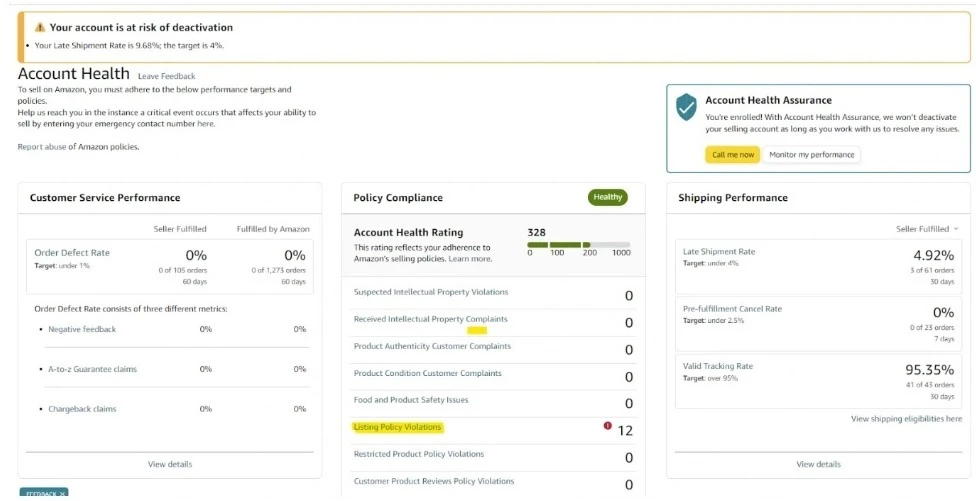
  1. Navigate to the Performance Dashboard

    • Log into your Amazon Seller Central account

    • Go to “Performance”

    • Select “Account Health”

    • Click on “Listing Policy Violation”

  1. Analyze the Violation

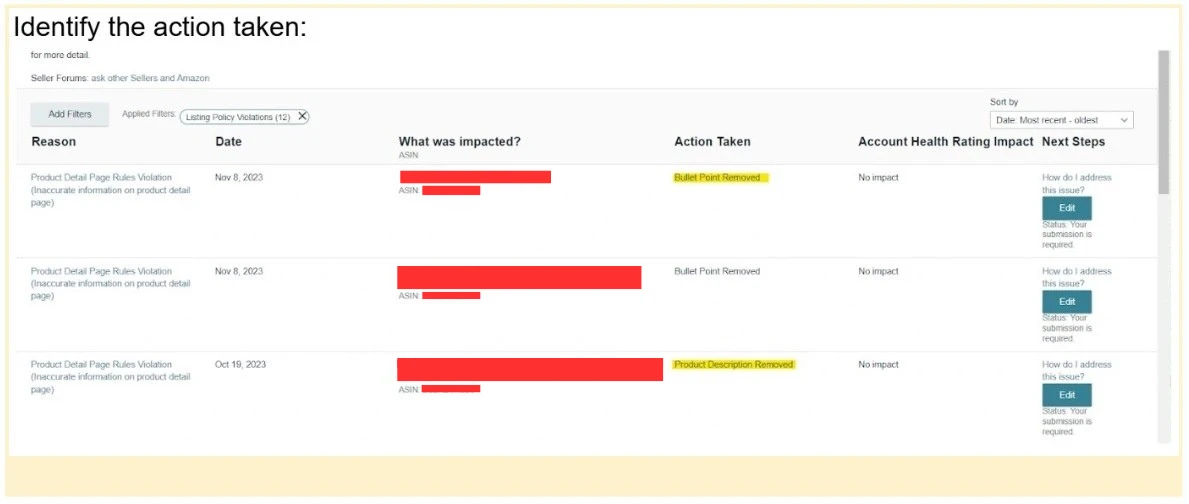
    • Carefully read the specific violation details

    • Understand exactly which part of your listing is problematic

    • Double-check any performance notification. Amazon is good at hiding some hints that you might need. Don’t count on seller support, most likely they won’t help you with that.

  2. Edit Listing Components

    • You want to edit the listing directly on the account health page. Don’t go to the listing page or it will trigger your listing to be reinstated

    • If bullet points are removed: Carefully reconstruct and edit them

    • If product description is affected: Revise the entire description

‍
Critical Editing Guidelines

  1. Capitalization Cleanup

    • Remove all-caps words

    • Eliminate words starting with capital letters (except at sentence beginnings or brand names)

    • Ensure clean, professional formatting

Pro Tips

Prevention is always better than cure when it comes to Amazon violations. Make it a regular practice to review your listings, stay informed about Amazon’s latest rules, and maintain honest, straightforward descriptions. Double and triple-checking everything before publishing can save you countless headaches down the road.

Feeling Stuck? You’re Not Alone!

When you’re faced with a violation that leaves you scratching your head, remember that help is available. Amazon Seller Support can provide valuable guidance, and connecting with other sellers in forums can offer practical insights. Sometimes, getting help from an Amazon optimization expert can provide the professional perspective needed to resolve complex issues.

The Bottom Line

Here’s the deal – Amazon’s rules might seem tough sometimes, but they’re there to create a marketplace where both sellers and customers can thrive. Think of them as your business’s guardrails, keeping you on the path to success!

Need help navigating these Amazon waters? We at Growth Scalers love turning these challenges into opportunities for your business to shine. Drop us a line, and let’s make sure your listings are not just compliant, but absolutely stellar!

Remember, every great Amazon seller has dealt with violations at some point. It’s not about avoiding them completely – it’s about handling them like a pro when they pop up. You’ve got this, and we’ve got your back!

Amazon Product Violations: Protecting Your Seller Account and Sales Potential

Sat Feb 08 2025 11:39:13 GMT+0000 (Coordinated Universal Time)

Facing Amazon product violations? Keep your seller account safe by promptly addressing issues. Discover smart strategies and protect your business.


Amazon New Defect and Reimbursement Portal

What Makes the IDR Portal a Game-Changer?

Imagine having a crystal ball for your inventory. This portal is like your personal inventory detective, offering insights that can save you time and money. Here’s what you’ll discover:

Comprehensive Tracking: Get the full story behind each inventory issue, from warehouse mishaps to customer returns.
Detailed Insights: Understand exactly what happened, when it happened, and why.
Reimbursement Opportunities: Identify potential recovery chances you might have missed before.

The portal doesn’t just show you problems – it gives you a roadmap to solve them. You’ll see the type of issue, its creation date, actions taken, and the current status of your claim. It’s like having a forensic accountant dedicated to your inventory.

How to Access Your New Inventory Ally

Getting started is simple. Log into your Seller Central account, navigate to the Inventory dropdown, and select Inventory Defect and Reimbursement. Want another way in? You can also access it through the Reimbursements report for an alternate route.

What’s Not Covered

Keep in mind that the portal has a few limitations. It doesn’t track missing inbound inventory, provide details on item removals, or include information about warehouse disposals.‍

Turning Insights into Action‍

This isn’t just another dashboard—it’s a powerful tool for safeguarding your bottom line. By regularly checking the IDR Portal, you can identify patterns in inventory issues, understand potential vulnerabilities, and even recover lost funds.

Need Expert Support?

At Growth Scalers, we specialize in turning complex Amazon tools into growth opportunities. If navigating this portal feels overwhelming, we’re here to help you make sense of it all and transform insights into increased profitability.

Pro Tip: Think of the IDR Portal as your inventory’s personal bodyguard – it’s watching out for you, so you can focus on growing your business.

Reference: Amazon Seller Central News

Amazon New Defect and Reimbursement Portal

Sat Feb 08 2025 22:27:22 GMT+0000 (Coordinated Universal Time)

Amazon’s new IDR Portal revolutionizes FBA inventory management with insights that save time and money, enabling smarter recoveries and fixes.

Amazon Listing Landmines

Amazon Listing Landmines: The Words That Could Sink Your Product Visibility‍

Amazon has been automating listing proof checking against legal requirements to avoid any lawsuit. As a result, they use bots to check your listing and flag it when it contains specific words. Once your listing is flagged, your account has a good chance to be flagged again and again. Therefore, we advise not using any of the words mentioned below in this article.

Why Does Amazon Care About These Words?

Amazon’s marketplace is a tightly regulated environment designed to protect consumers and maintain a high standard of product representation. The words on our “prohibited” list aren’t just random restrictions – they’re carefully curated to prevent:‍

  1. Misleading Health Claims: Many of these words suggest medical or therapeutic benefits that the product hasn’t been scientifically proven to deliver.

  2. Potential Legal Liability: Terms like “non-toxic” or “harmless” can create unrealistic expectations about product safety.

  3. ‍Regulatory Compliance: Words related to pesticides, microbes, and medical treatments require strict FDA or EPA approval.

The Forbidden Word Minefield

Imagine crafting what you believe is the perfect product listing, only to have it suppressed or removed. Amazon searches for these restricted words in multiple places:

  • Product Titles

  • Bullet Points

  • Product Descriptions

  • Backend Search Terms

  • Image Alt Text

Words to Absolutely Avoid:

Here’s a comprehensive list of words that could trigger Amazon’s compliance algorithms:

Health and Safety Claims

  • Non-toxic

  • All-natural

  • Eco-friendly

  • Harmless

  • Non-poisonous

Biological and Medical Terms

  • Microbe

  • Anti-bacterial

  • Virus

  • Bacteria

  • Fungus

  • CBD

  • Essential oil (as a claim)

Pest and Insect Related

  • Insecticide

  • Pesticide

  • Repellent

  • Specific insect names (Tick, Fly, Wasp, Lure, etc.)

  • Mold

  • Mildew

Environmental Claims

  • Recyclable

  • Earth-friendly

  • BPA Free

Pro Tips for Sellers

  1. Be Specific, Not Sensational: Instead of saying “non-toxic,” describe your product’s actual properties.

  2. Focus on Verifiable Benefits: Highlight concrete features rather than making sweeping claims.

  3. ‍Use Compliance Tools: Develop scripts or use professional tools to scan your listings for restricted words.

The Growth Scalers Advantage

At Growth Scalers, we understand the complex landscape of eCommerce platforms. Our dedicated platform experts can help you:

  • Navigate platform-specific restrictions

  • Optimize your product listings

  • Ensure maximum visibility while maintaining compliance

Want to Avoid Listing Pitfalls?

Don’t let restricted words become your eCommerce nightmare. Our team can help you craft compelling, compliant listings that drive sales and protect your seller account.

Ready to scale your eCommerce success? Contact Growth Scalers today

Disclaimer: This list is based on current Amazon guidelines and may change. Always consult the latest platform policies and consider professional guidance.

Amazon Listing Landmines

Mon Dec 16 2024 20:46:52 GMT+0000 (Coordinated Universal Time)

Amazon automates checks on product listings to prevent legal issues, flagging those with forbidden words. Avoid these pitfalls to maintain visibility.

8 Things You Need to Know about ACoS

Many customers ask us how much they should spend on advertising, and what is a good ACoS (advertising cost of sales). The answer to this, as for many business questions, is the same: it depends. Let’s get a better understanding on what is a good ACoS and how to improve it.

How to calculate ACoS?

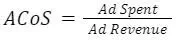
ACoS stands for Advertising Cost of Sales and measures how efficient your advertising spends are to generate sales. The higher the ACoS, the more you spend to generate sales and the less profitable you are.‍

If your ACoS is 20%, this means that you spend $20 in advertising to get $100 in sales.

What is the difference between ACoS and ROAS?

RoAS stands for Return on Ads Spent and is very similar to ACoS. It is defined as followed:‍

As you can see, RoAS is the inverse of ACoS. So you will ask me, why do we need RoAS? The truth is that RoAS has been around longer, especially for people who manage Google Ads accounts. RoAS measures in the same way as ACoS to see how efficient is your advertising spend. The higher your RoAS, the less spend to generate sales and the more profitable you are.

What is a good ACoS on Amazon?

A good ACoS is relative. If your ACoS is 10%, but your operating margin is 8%, you are losing money. Now, if your ACoS is 10% but your operating margin is 30%, you might think that your ACoS is good. However, you might be leaving some money on the table and miss incremental profitable sales. An ACoS of 15 % with $5000 of net income is better than an ACoS of 10% with $2000 of net income.

How to reduce ACoS on amazon?

In our experience, here is the best way to keep the TACoS under control:

  • Monitor weekly during low season and daily during high season the TACoS. If you can’t measure it, you can’t improve it.

  • Structure your accounts around customer intent: brand, generic, long tail, competitors, substitute products. Watch out intent from broad match keywords in your search query report.

  • Add negative keywords to block unrelated intent and keep control of your account structure.

  • Increase bids for keywords or product targeting below your Target ACoS and decrease bids for those higher than your Target ACoS.

  • Use bid adjustment to rank higher on top of the page for top keywords like Amazon’s Choice keywords, high traffic and autocomplete keywords.

How to calculate break-even ACoS?

If you break-even, it means that you don’t make any profit or loss. Your revenue is just enough to cover your cost. This is not a good or a bad thing as you might want to break even to grow faster, get more reviews, or increase your market share and create brand awareness before increasing your price or lowering your cost.

To understand your break-even point is very important in understanding if your business can sustain in the long term.

To calculate your break-even ACoS, you need to list all your fixed and variable costs. A fixed cost doesn’t depend on the number of units you sell. Variable cost directly depends on your sales. Here is the list of the costs you might want to consider.
Fixed costs:

  • Amazon monthly fees

  • CPA or accounting expenses

  • Any monthly subscription, like Helium 10

  • And so on…

Variable costs:

  • Shipping cost from supplier to Amazon Fulfillment Center

  • Shipping cost to end customer, if you sell through FBM

  • Referral fee

  • Fulfillment fees, like FBA

  • Rebate

  • Return and Refund

Once you have listed all your costs, enter them in a spreadsheet and allocate your fixed cost per unit. Divide your monthly total fixed cost by the number of units you sold per month.

Deduce your fixed cost from your unit price.

  • Selling price

    • Fixed cost allocated by unitssome text

      • Amazon Monthly fees

      • CPA & Accounting

      • Subscription fees

Now deduce variable costs:

  • Variable costs:some text

    • Cost of Goods Sold (COGS)- per unit: How much do you pay to pay for a unit that you sell. This can also be your manufacturing cost if you are a manufacturer.

    • Shipping Cost – per unit: for instance if you pay $200 for 4000 units, it will be $0.05 per unit

    • Amazon referral fees: 15% on average, click here for more details

    • Fulfillment fees like FBA fees, click here for more details

    • Rebate or vine costs

    • Return fees: for each unit return, you still need to pay the fulfillment fees as well as on average 20% of the referral fees. In other words, if your return rate is 10%, your selling price is $20, your referral fee is 15% and your fulfillment fee is $5.43. Your return fees will be around $5.43*10%+20%*10%(return rate)*15%(referral) *$20(selling price)=$0.60

Let’s walk through an example. If you sell 600 units a month at $20, here is what your profit may look like:

  • Selling price: $20

Fixed cost:

  • Monthly Amazon fee: $39.99/600=$0.06

  • CPA : $25/600=$0.04

Variable cost:

  • Cost of Goods Sold: $5

  • Cost of shipping: $150/600=$0.25

  • Amazon referral fees: $20*15%=$3

  • FBA fees =$5.43

  • Return cost: $0.60
    =$5.62

This means that for each unit you sell, you make $5.62 profit.

Note: The more you sell, the more your fixed cost becomes irrelevant.

Now, get the ration between your operational profit and your sales.‍

This gives a ratio of $5.62/$20 = 28.1%

Now if your ACoS is 28.1%, you break-even (with regards to advertising). This means that you don’t make any profit or loss from advertising sales. If your ACoS is lower than your Operating profit ratio, you are profitable.

Having said that, the Amazon A10 Algorithm is based on Sales Velocity. The more you sell, the more you sell. Your ranking depends on your sales of the last 30 days. Therefore, many sellers are willing to breakeven on advertised traffic to get more organic sales.

What should my ACoS be on Amazon?

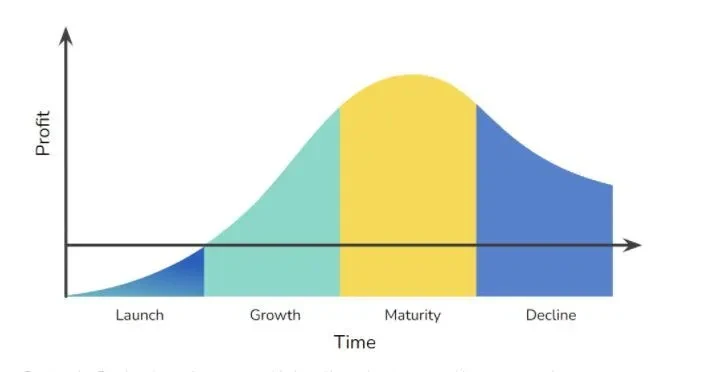
Your Target ACoS depends on the profit you want to make, and the phase of your product life cycle.‍

During the Product Launch, you most likely will need to invest and have to spend more money to increase your reviews and get more social proof. During the Growth phase, your profit increases. You scale up ads and gain market share. The maturity phase is the stage where you are the most profitable. It is the right time to think about launching new products to avoid loss in revenue.

What does TACoS mean in Amazon?

In fact, many eCommerce businesses are walking away from ACoS and prefer looking at the TACoS:‍

Especially for 2 reasons:

  • The operating margin (Sales – Cost of Good Sold – Fulfillment – Shipping Cost – Return) can easily be compared with the TACoS. If the operating margin is larger than the TACoS, the business makes money.

  • Advertising sales have an impact on organic sales. On Amazon, for instance, advertising sales improves the seller ranking which leads to more organic sales. In addition, the more sales your product gets, the more reviews you have, and the better are your conversion rates.

What is the difference between TACoS and ACoS?

Whereas your ACoS only measures the performance of your Ads, the TACoS measures your overall selling performance. The more you sell through organic, the lower is your TACoS. As you develop more upselling and cross selling strategies, and as people become aware of your brand, you will also drive more organic traffic. This traffic is not captured by the ACoS.

Final Thoughts:

Every industry, and therefore every product category, is different. We have seen hundreds, if not thousands, of Amazon accounts and can give you better advice on how well you are doing compared to your industry average. If you need help with decreasing your ACoS and make your business more profitable, we offer a free account analysis that includes:

  • A competitor and market analysis

  • A clear and predictable pricing

  • A road map and an action plan that we would follow if you were working with us

‍

8 Things You Need to Know about ACoS

Tue Mar 12 2024

Discover what makes a good Amazon ACoS (Advertising Cost of Sales) and how to optimize it for your business. Learn to calculate break-even points, understand the relationship between ACoS and TACoS, and implement proven strategies to reduce advertising costs. Essential reading for Amazon sellers looking to improve advertising efficiency and maximize profitability across product lifecycles.

AI Prompting for Marketing: Get the Most Out of GenAI

If like me you have been using AI in your daily workflow but always felt that you could get more out of it by improving the way you frame your problem, this guide is for you. We are going to cover the best practices for writing emails, creating blog articles, websites and much more.

Who Can Do What?‍

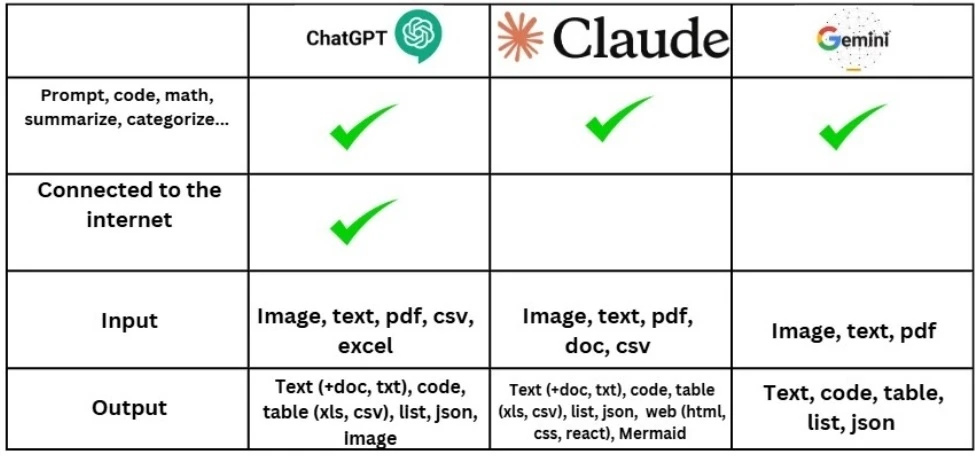
By understanding the strengths and limitations of these tools, you can leverage AI to improve your marketing strategies and streamline your workflow.

How to craft an efficient prompt

1. Define Your Task with Crystal Clarity

Think of crafting an AI prompt like giving a detailed task to an intern who don’t know anything about your company. The more specific you are, the better the result. Your task should be:

  • Clearly defined

  • Complete with output format requirements

Pro Tip: Instead of saying “Write an email,” try “Write a professional follow-up email to a potential client, highlighting our recent project success and next steps.”

Here are some examples of tasks you can perform:

  • Emailing

  • Brainstorming

  • Building tables

  • Summarizing documents

  • Categorizing

2. Add a persona

You want the AI to act as if it was a person so that the output sounds more natural. To do so, you can give it a persona. For example:

  • “Act as a Brand Manager”

  • “Act as an Email Copywriter”

  • “Act as an HR Manager”

  • “Act as a Digital Marketing Strategist specializing in eCommerce”

3. Provide Rich Context

Context is the difference between a generic response and a tailored masterpiece. Don’t just state what you want – explain the entire landscape. For instance:

  • Team dynamics

  • Current project status

  • Communication preferences

  • Specific challenges

Example: Rather than “Write about our project,” say “Write a project update email for our 12-person software development team, addressing a two-week delay caused by unexpected third-party API changes, while maintaining team morale.”

4. Include Relevant References

Want truly exceptional output? Provide examples. Screenshots, previous successful outputs, or detailed descriptions can guide the AI to exactly what you’re looking for.

5. Provide an output format

You might want the output to be a table or an email or a csv file so that you can import it in Google Ads editor. Be precise and specify the output format. Here are some examples:

  • Organize that data into a table

  • Write a product description in HTML format with separate sections for features, specifications, and benefits

  • Output the data as json

  • Quantitative Requirements

           – Word/character counts: “Provide a 500-word blog post”
           – Section lengths: “Include 3 paragraphs per section”
           – Time estimates: “Create a 30-minute presentation outline”‍

  • Structural Requirements

          – Headers and subheaders: “Use H2 for main sections, H3 for subsections”
          – Formatting: “Include bold text for key terms and italic for examples”
          – Lists and tables: “Present data in a 3-column table with sortable headers”‍

  • Style Guidelines

          – Tone: “Write in a conversational but professional tone”
          – Language level: “Use conversational language”
          – Technical depth: “Explain concepts assuming no prior technical knowledge”


6. Evaluate Critically

Don’t take the output at face value. Remember that you are working with a tool that behaves as if it were an intern who freshly started your business. Always double-check that the work done is what you expect. Take it as a draft and rework it until you are satisfied with the output.

After receiving the AI-generated content:

  • Check for factual accuracy

  • Verify the tone matches your requirements

  • Ensure it meets all specified guidelines

7. Iterate and Refine

Prompting is an art, not a one-shot deal. Don’t expect perfection on the first try. Analyze the output, provide feedback, and refine your prompt.

Example of a well-structured prompt:
Persona
Context
Task

I’m a marketer working for an eCommerce marketing agency.  Our client is planning the launch of a new haircurler that dries hair in no time. The primary audience is young female adults. The product is reaching the end stages of development, and I need help creating a timeline before it goes live. Provide a rough timeline for the year leading up to its launch. Also, provide some pre-launch ideas to help generate buzz around the product.

Avoiding Common AI Pitfalls

Beware of Hallucinations

AI can sometimes generate impressive-sounding but completely fictional content. Always fact-check the output against reliable sources.

Recognize Potential Biases

Remember, AI models are trained on human-generated content. They might inadvertently reflect certain biases. Stay vigilant and review content with a critical eye.

Best Practices to Level Up Your Prompting Game

  1. Break complex prompts into shorter, more digestible sentences

  2. Introduce clear constraints (word count, target audience, tone)

  3. Be specific about formatting requirements

  4. Use clear, conversational language

  5. Provide step-by-step guidance when complexity increases

Practical Prompt Structure Template

Persona : [Specific Role]
Context: [Detailed Background]
Task: [Precise Instruction]
Output Format: [Specific Requirements]
Constraints: [Length, style, target audience]‍

Ready to get the most out of Generative AI? Start refining your prompts today and watch your marketing content soar!

AI Prompting for Marketing: Get the Most Out of GenAI

Sat Feb 08 2025 14:53:35 GMT+0000 (Coordinated Universal Time)

Unlock the full potential of AI in your marketing. Discover effective prompting techniques to elevate emails, blogs, and websites effortlessly.

Amazon Deal Secrets: How to Skyrocket Your Sales in 2025

Ever feel like you’re throwing great products into the vast Amazon ocean, hoping they’ll catch someone’s eye? Well, grab your notepad because I’m about to share some game-changing secrets about Amazon deals that transformed our client’s selling journey (and can do the same for yours!).

The Deal-Making Magic You Need to Know

Let me paint you a picture of what’s possible. Imagine your products not just sitting on Amazon’s digital shelves, but actively grabbing attention with irresistible deals that make shoppers think, “I need this NOW!” That’s exactly what smart deal strategies can do for your store.

Your Ultimate Deal Arsenal (And How to Use It)
1. Lightning Deals: Your FOMO-Triggering Superpower

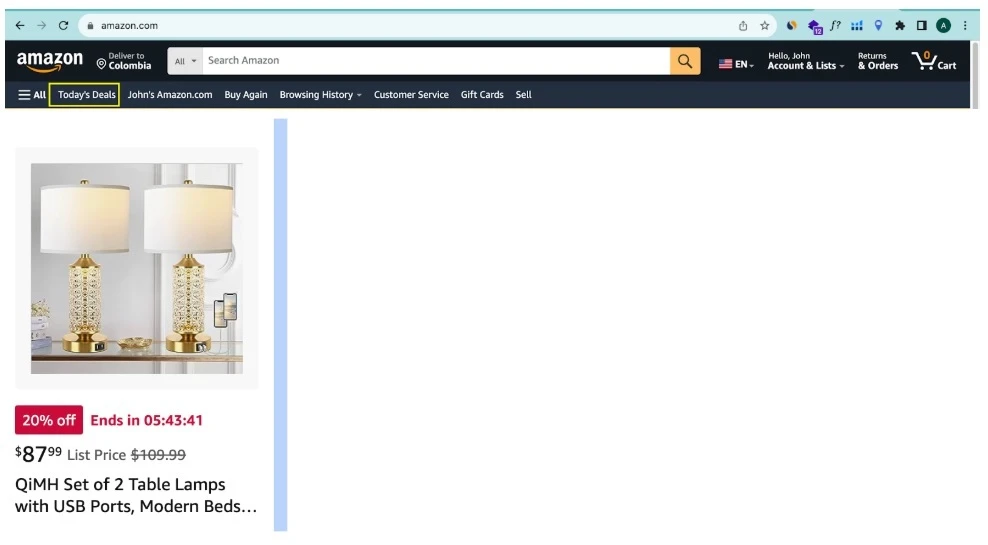
Remember that feeling when you saw something amazing on sale, but waited too long and missed out? That’s exactly what Lightning Deals tap into! These time-sensitive beauties:

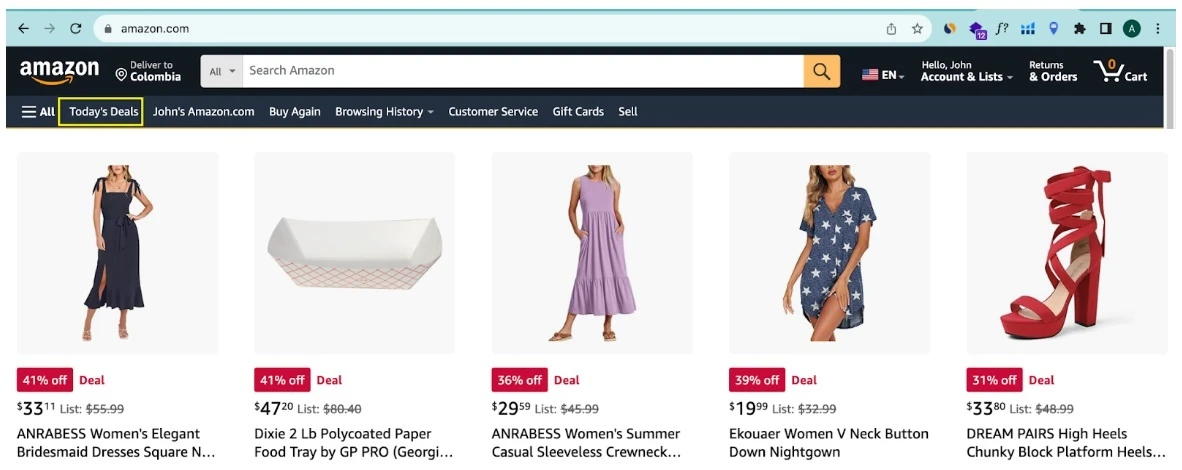
  • Get prime real estate on Amazon’s “Today’s Deals” page (hello, visibility!)

  • Show that anxiety-inducing countdown timer (pushing shoppers to act fast)

  • Need at least 3.5 stars to qualify (so keep those reviews sparkly!)

Pro Tip: Think of Lightning Deals as your digital flash sale. They’re perfect when you want to create buzz around a new product or clear out inventory with a bang!

‍
2. Best Deals: Your Two-Week Spotlight

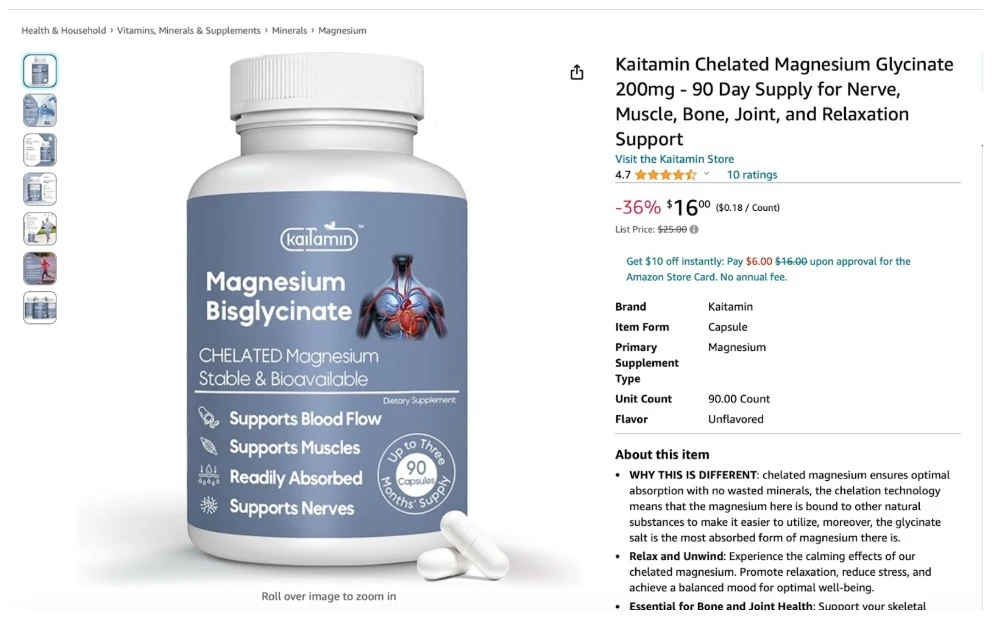
This is your chance to shine for a full two weeks! Imagine having a bright red “Best Deal” badge that practically screams “Look at me!” to shoppers. You can even:

  • Use “deal” keywords in your Sponsored Brand ads (sneaky, right?)

  • Show off your deals right on your Amazon Store page

  • Give customers plenty of time to discover and grab your offers

For Amazon sellers looking to balance visibility, marketing flexibility, and sustained promotional power, Best Deals represents a nuanced and effective strategy to elevate their online selling performance.

‍3. Price Discounts: Your Flexible Friend

Sometimes, simple is better. Price discounts are like that reliable friend who’s always there when you need them. They:

  • Don’t need fancy minimum thresholds

  • Show that satisfying struck-through original price

  • Can run for up to a year (talk about commitment!)

4. Coupons: Your Orange Ticket to Sales

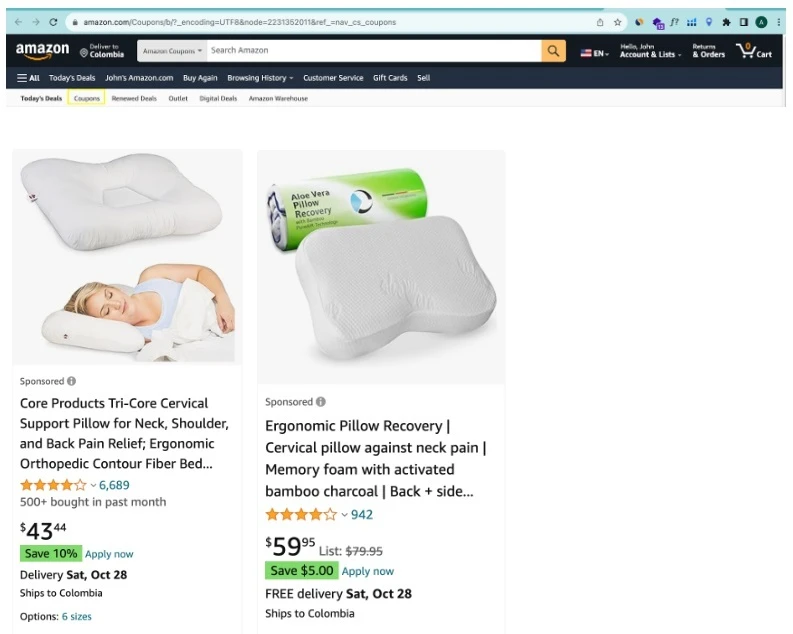
Do you know those green “Coupon” badges that make you want to click? You can create them too! They’re like digital candy for bargain hunters, and the best part? Shoppers have to actively click to claim them – talk about engagement!

5. Prime Exclusive Discounts: Your VIP Club

Want to tap into Amazon’s most loyal shoppers? Prime Exclusive Discounts are your backstage pass to this premium audience. Just remember:

  • Offer at least 10% off

  • Make sure you’re Prime-eligible

  • Watch non-Prime members get FOMO and potentially join Prime just to grab your deals!

6. Brand Tailored Promotions: Your Secret Weapon‍

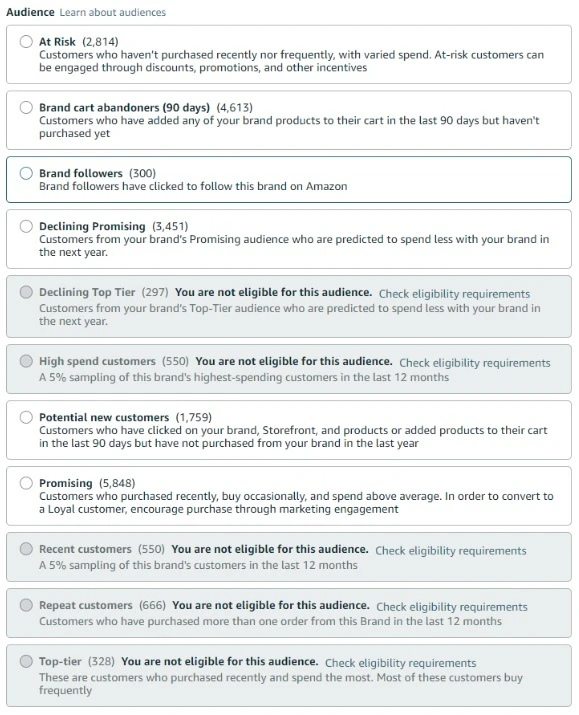
This is where you get to play chess while others play checkers. Target specific customers like:

  • Cart abandoners (we see you, hesitant shoppers!)

  • Past purchasers (come back, we miss you!)

  • Window shoppers (time to make it official!

Pro Tips from the Trenches

Let me share some battle-tested wisdom:
  • Keep those star ratings above 3.5 (happy customers = more deal opportunities)

  • Mix and match different deal types (variety is the spice of life!)

  • Use urgency wisely (but don’t cry wolf – authenticity matters!)

Ready to Rock Your Amazon Sales?

Remember, these deals aren’t just promotional tools – they’re your ticket to standing out in Amazon’s bustling marketplace. Start small, test what works for your products, and don’t be afraid to get creative!

Need help crafting your perfect deal strategy? Drop us a line at Growth Scalers – we’ve helped countless sellers turn their Amazon presence from invisible to irresistible!

Quick heads up: Amazon likes to shake things up sometimes, so always double-check their latest guidelines before launching any deals. Trust me, it saves headaches later!

Amazon Deal Secrets: How to Skyrocket Your Sales in 2025

Sat Feb 08 2025 14:54:38 GMT+0000 (Coordinated Universal Time)

Skyrocket your Amazon sales in 2025 with proven deal secrets! Learn strategies to make your products shine and amplify your selling journey today.