I have seen businesses selling millions on Amazon, with dozens of staff members, shut down because of policy violations. This is the one thing you should never skip. Treat every violation as urgently as you would a million-dollar deal.
Why product violations matter
When a listing gets flagged, the damage goes beyond that listing. Your account health can take a hit, your top products can be deindexed, and once Amazon has flagged you, your account stays at risk.
Common violations
Product descriptions
Amazon has specific rules on what a description can say. Don’t use ALL CAPS to grab attention, and don’t claim your product is the “best in the world.” Stick to facts you can prove.
Bullet points
Bullet points should be short and to the point. Don’t add phrases like “Buy Now” or “Limited Time Offer”; keep those for your external marketing. Use the bullets to tell customers what makes your product different.
What to do when you get a violation
Find and fix the violation
-
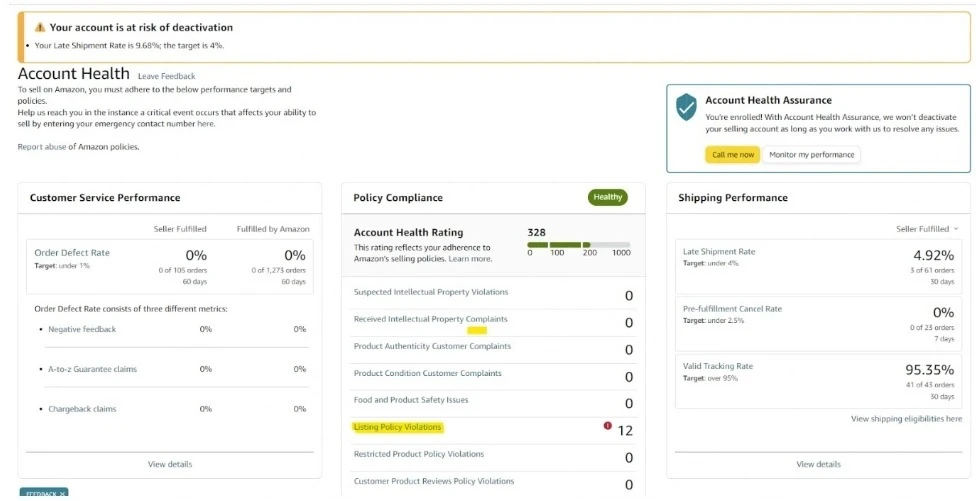
Open the Account Health page
-
Log into Amazon Seller Central
-
Go to “Performance”
-
Select “Account Health”
-
Click on “Listing Policy Violation”
-
-
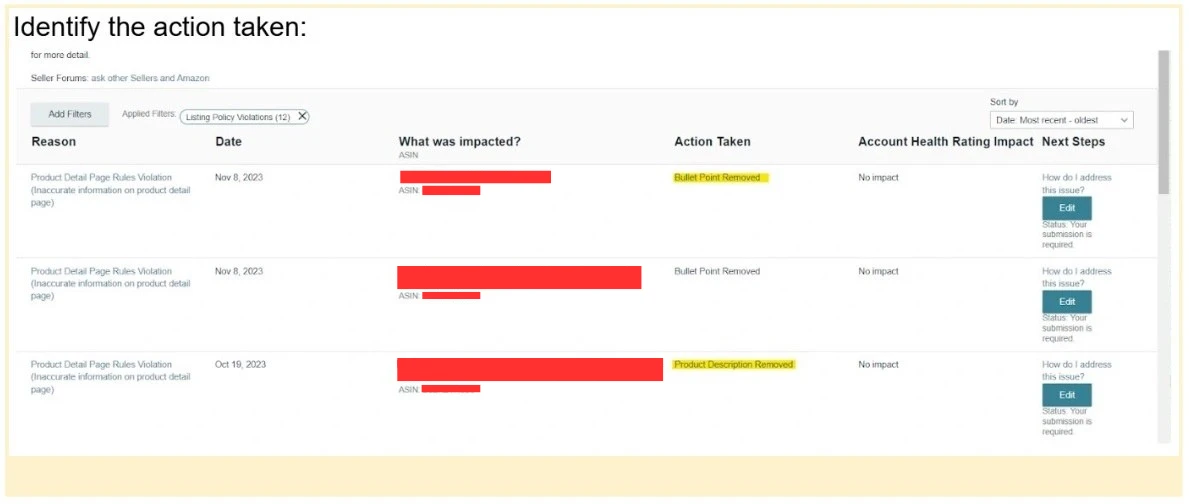
Read the violation
-
Read the violation details carefully
-
Identify exactly which part of your listing is the problem
-
Check your performance notifications too. Amazon often leaves hints there that you will need. Don’t count on Seller Support for this; most likely they won’t help you.
-
-
Edit the listing
-
Edit the listing directly from the Account Health page. Don’t go through the listing page.
-
If bullet points were removed, rewrite and edit them carefully
-
If the product description is affected, revise the entire description
-
Editing rules
-
Fix the capitalization
-
Remove all-caps words
-
Remove capital letters at the start of words, except at the beginning of a sentence or in brand names
-
Keep the formatting clean and professional
-
Prevent violations
Preventing a violation is much easier than fixing one. Review your listings regularly, keep up with Amazon’s rule changes and keep your descriptions honest and factual. Check everything twice before you publish.
If you are stuck
Some violations are hard to understand. You can ask Amazon Seller Support for guidance, and other sellers in forums often have practical answers. For complex cases, an Amazon optimization expert can help you resolve the issue.
The bottom line
Amazon’s rules can feel strict, but they exist to keep the marketplace trustworthy for sellers and customers. Most sellers deal with a violation at some point. What matters is fixing it quickly and correctly.
If you need help with a violation or want your listings reviewed, book a call with us.