A small labeling or packing mistake can leave your inventory stuck in the warehouse, cost you relabeling fees and push you out of stock. Get the preparation right and creating the shipment in Seller Central is simple.
What FBA does for you
With Fulfillment by Amazon (FBA), Amazon stores your products, picks the orders, packs the boxes, ships to customers and handles customer service. You get a warehouse team without hiring one.
Why your shipments need to be right
A small labeling mistake can leave your inventory stuck before it is received, and Amazon charges relabeling fees. While your products are stuck in the warehouse pipeline, you can run out of stock, which hurts your sales.
When your shipments are done right:
-
Your operational costs drop
-
Your inventory turns over faster
-
Your IPI score goes up
-
You get better storage limits
Before you create the shipment
The information you need
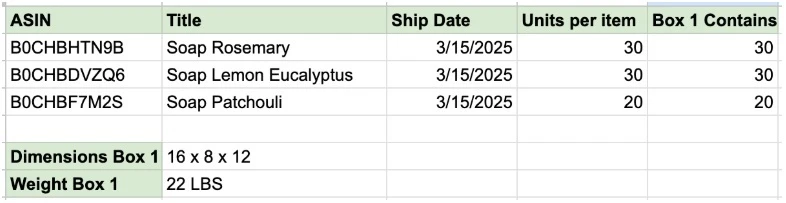
Before creating a shipment, you need three pieces of information:
-
Box dimensions: accurate measurements ensure proper handling
-
Box weight: precise weights prevent shipping discrepancies
-
ASINs per box: which products go in which box
Here is the format we use to collect this information:
How to create your FBA shipment
Step 1: Open Send to Amazon in Seller Central
-
Log in to your Amazon Seller Central dashboard
-
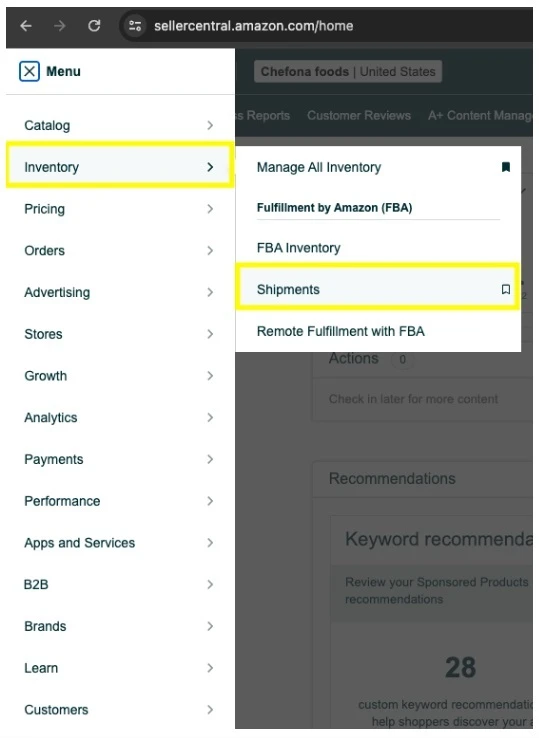
Go to Inventory > Shipments
-
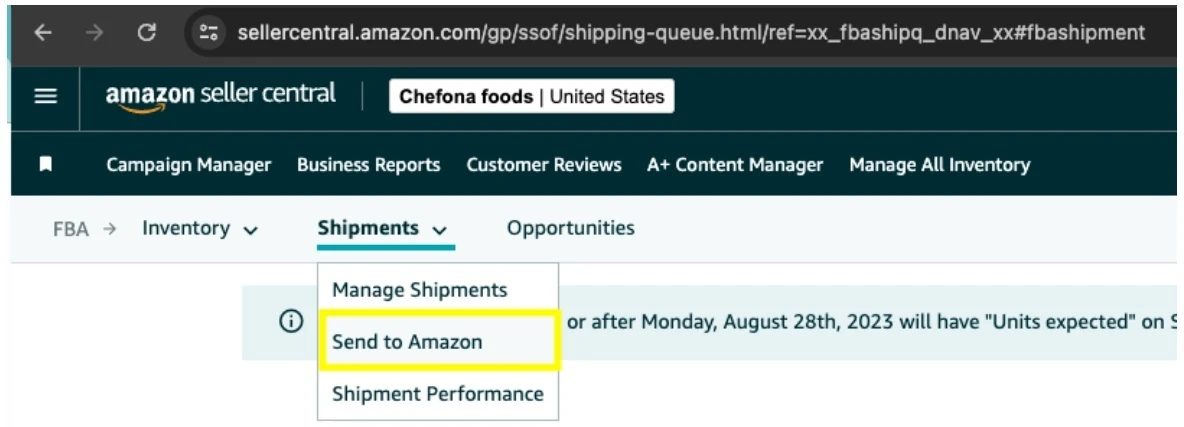
Select “Send to Amazon” to start the process
-
Enter your shipment details carefully
Two habits that save money
-
Keep a detailed inventory spreadsheet.
-
Don’t cheap out on labels and printing equipment. Saving a few dollars there leads to expensive problems later.
Need help?
We handle FBA shipments for our clients. We keep shipments moving, avoid the common mistakes, track everything, keep costs down and keep inventory at the right level.
If you would rather have us do it for you, book a call with us.