Amazon Product Violations: Protecting Your Seller Account and Sales Potential

What we’re learning, published as we learn it.

I have seen businesses selling millions on Amazon with dozens of staff members having to shut down because of Policy Violation.

Amazon Product Violations: Protecting Your Seller Account and Sales Potential

I have seen businesses selling millions on Amazon with dozens of staff members having to shut down because of Policy Violation. Trust me, this is the number one thing that you shouldn’t skip and that can jeopardize your business. Address them promptly as if someone would like to sign a million-dollar deal with you.

Why Should You Care About Product Violations?

When your listing gets flagged, it can impact your business in ways you might not expect. Your account health could take a hit, your top products can be deindexed and your once flagged by Amazon will always be at risk. But don’t panic – we’re here to help you avoid all that drama.

Common Violations You Might Run Into

Those Tricky Product Descriptions

Ever gotten carried away describing your amazing product? I get it – you’re excited about what you’re selling! But Amazon has some pretty specific ideas about what makes a good description. Using ALL CAPS might seem like a great way to grab attention, but Amazon’s not a fan. And claiming your product is the “best in the world”? Let’s keep it real and stick to facts we can prove.

Bullet Point Blunders

Your bullet points are like your product’s elevator pitch – short, sweet, and to the point. Avoid throwing in phrases like “Buy Now!” or “Limited Time Offer!” (Save those for your external marketing). Instead, focus on telling your customers exactly what makes your product special.

I Got a Violation – What Now?

Don’t panic! Here’s your step-by-step game plan:

Locating Your Violation

  1. Navigate to the Performance Dashboard

    • Log into your Amazon Seller Central account

    • Go to “Performance”

    • Select “Account Health”

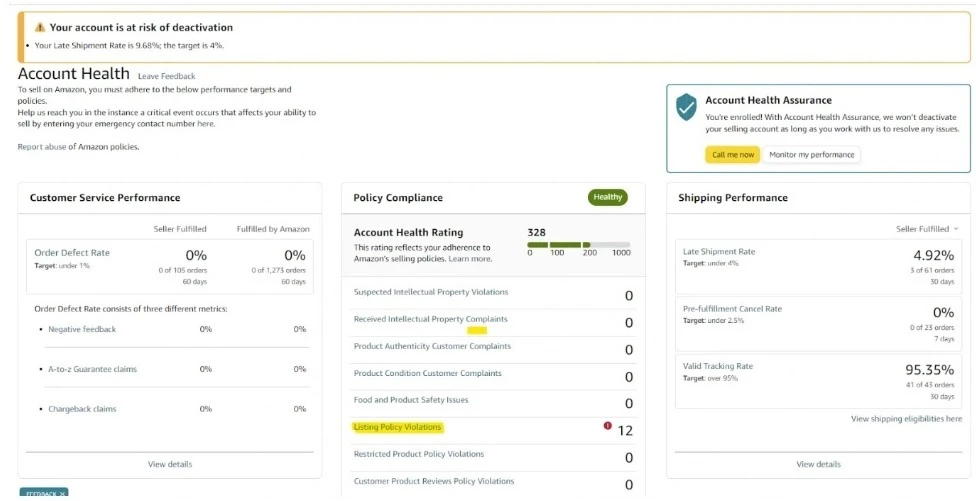
    • Click on “Listing Policy Violation”

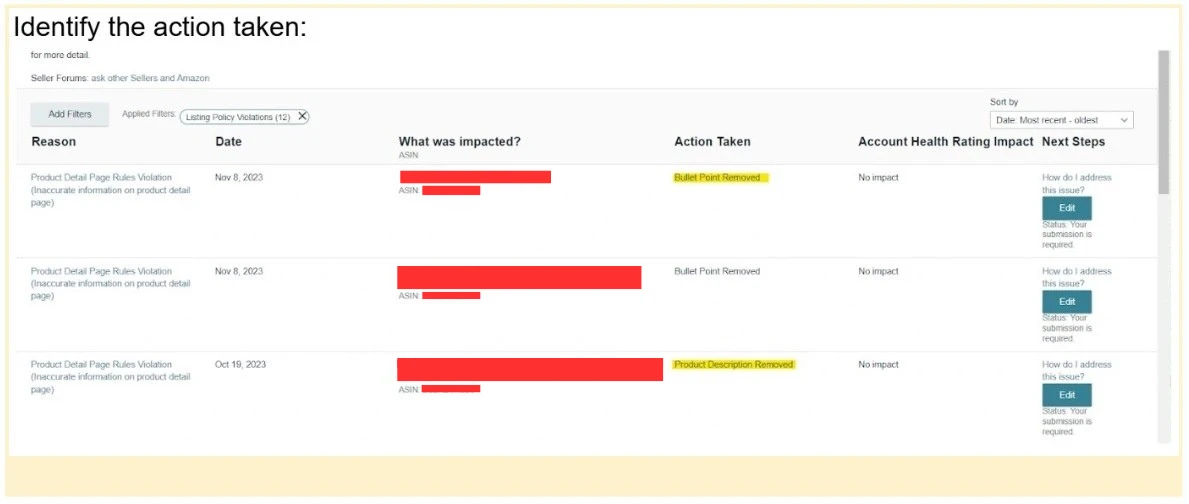
  1. Analyze the Violation

    • Carefully read the specific violation details

    • Understand exactly which part of your listing is problematic

    • Double-check any performance notification. Amazon is good at hiding some hints that you might need. Don’t count on seller support, most likely they won’t help you with that.

  2. Edit Listing Components

    • You want to edit the listing directly on the account health page. Don’t go to the listing page or it will trigger your listing to be reinstated

    • If bullet points are removed: Carefully reconstruct and edit them

    • If product description is affected: Revise the entire description

‍
Critical Editing Guidelines

  1. Capitalization Cleanup

    • Remove all-caps words

    • Eliminate words starting with capital letters (except at sentence beginnings or brand names)

    • Ensure clean, professional formatting

Pro Tips

Prevention is always better than cure when it comes to Amazon violations. Make it a regular practice to review your listings, stay informed about Amazon’s latest rules, and maintain honest, straightforward descriptions. Double and triple-checking everything before publishing can save you countless headaches down the road.

Feeling Stuck? You’re Not Alone!

When you’re faced with a violation that leaves you scratching your head, remember that help is available. Amazon Seller Support can provide valuable guidance, and connecting with other sellers in forums can offer practical insights. Sometimes, getting help from an Amazon optimization expert can provide the professional perspective needed to resolve complex issues.

The Bottom Line

Here’s the deal – Amazon’s rules might seem tough sometimes, but they’re there to create a marketplace where both sellers and customers can thrive. Think of them as your business’s guardrails, keeping you on the path to success!

Need help navigating these Amazon waters? We at Growth Scalers love turning these challenges into opportunities for your business to shine. Drop us a line, and let’s make sure your listings are not just compliant, but absolutely stellar!

Remember, every great Amazon seller has dealt with violations at some point. It’s not about avoiding them completely – it’s about handling them like a pro when they pop up. You’ve got this, and we’ve got your back!

Amazon Product Violations: Protecting Your Seller Account and Sales Potential

Sat Feb 08 2025 11:39:13 GMT+0000 (Coordinated Universal Time)

Facing Amazon product violations? Keep your seller account safe by promptly addressing issues. Discover smart strategies and protect your business.

Amazon New Defect and Reimbursement Portal

What Makes the IDR Portal a Game-Changer?

Imagine having a crystal ball for your inventory. This portal is like your personal inventory detective, offering insights that can save you time and money. Here’s what you’ll discover:

Comprehensive Tracking: Get the full story behind each inventory issue, from warehouse mishaps to customer returns.
Detailed Insights: Understand exactly what happened, when it happened, and why.
Reimbursement Opportunities: Identify potential recovery chances you might have missed before.

The portal doesn’t just show you problems – it gives you a roadmap to solve them. You’ll see the type of issue, its creation date, actions taken, and the current status of your claim. It’s like having a forensic accountant dedicated to your inventory.

How to Access Your New Inventory Ally

Getting started is simple. Log into your Seller Central account, navigate to the Inventory dropdown, and select Inventory Defect and Reimbursement. Want another way in? You can also access it through the Reimbursements report for an alternate route.

What’s Not Covered

Keep in mind that the portal has a few limitations. It doesn’t track missing inbound inventory, provide details on item removals, or include information about warehouse disposals.‍

Turning Insights into Action‍

This isn’t just another dashboard—it’s a powerful tool for safeguarding your bottom line. By regularly checking the IDR Portal, you can identify patterns in inventory issues, understand potential vulnerabilities, and even recover lost funds.

Need Expert Support?

At Growth Scalers, we specialize in turning complex Amazon tools into growth opportunities. If navigating this portal feels overwhelming, we’re here to help you make sense of it all and transform insights into increased profitability.

Pro Tip: Think of the IDR Portal as your inventory’s personal bodyguard – it’s watching out for you, so you can focus on growing your business.

Reference: Amazon Seller Central News

Amazon New Defect and Reimbursement Portal

Sat Feb 08 2025 22:27:22 GMT+0000 (Coordinated Universal Time)

Amazon’s new IDR Portal revolutionizes FBA inventory management with insights that save time and money, enabling smarter recoveries and fixes.

Amazon Listing Landmines

Amazon Listing Landmines: The Words That Could Sink Your Product Visibility‍

Amazon has been automating listing proof checking against legal requirements to avoid any lawsuit. As a result, they use bots to check your listing and flag it when it contains specific words. Once your listing is flagged, your account has a good chance to be flagged again and again. Therefore, we advise not using any of the words mentioned below in this article.

Why Does Amazon Care About These Words?

Amazon’s marketplace is a tightly regulated environment designed to protect consumers and maintain a high standard of product representation. The words on our “prohibited” list aren’t just random restrictions – they’re carefully curated to prevent:‍

  1. Misleading Health Claims: Many of these words suggest medical or therapeutic benefits that the product hasn’t been scientifically proven to deliver.

  2. Potential Legal Liability: Terms like “non-toxic” or “harmless” can create unrealistic expectations about product safety.

  3. ‍Regulatory Compliance: Words related to pesticides, microbes, and medical treatments require strict FDA or EPA approval.

The Forbidden Word Minefield

Imagine crafting what you believe is the perfect product listing, only to have it suppressed or removed. Amazon searches for these restricted words in multiple places:

  • Product Titles

  • Bullet Points

  • Product Descriptions

  • Backend Search Terms

  • Image Alt Text

Words to Absolutely Avoid:

Here’s a comprehensive list of words that could trigger Amazon’s compliance algorithms:

Health and Safety Claims

  • Non-toxic

  • All-natural

  • Eco-friendly

  • Harmless

  • Non-poisonous

Biological and Medical Terms

  • Microbe

  • Anti-bacterial

  • Virus

  • Bacteria

  • Fungus

  • CBD

  • Essential oil (as a claim)

Pest and Insect Related

  • Insecticide

  • Pesticide

  • Repellent

  • Specific insect names (Tick, Fly, Wasp, Lure, etc.)

  • Mold

  • Mildew

Environmental Claims

  • Recyclable

  • Earth-friendly

  • BPA Free

Pro Tips for Sellers

  1. Be Specific, Not Sensational: Instead of saying “non-toxic,” describe your product’s actual properties.

  2. Focus on Verifiable Benefits: Highlight concrete features rather than making sweeping claims.

  3. ‍Use Compliance Tools: Develop scripts or use professional tools to scan your listings for restricted words.

The Growth Scalers Advantage

At Growth Scalers, we understand the complex landscape of eCommerce platforms. Our dedicated platform experts can help you:

  • Navigate platform-specific restrictions

  • Optimize your product listings

  • Ensure maximum visibility while maintaining compliance

Want to Avoid Listing Pitfalls?

Don’t let restricted words become your eCommerce nightmare. Our team can help you craft compelling, compliant listings that drive sales and protect your seller account.

Ready to scale your eCommerce success? Contact Growth Scalers today

Disclaimer: This list is based on current Amazon guidelines and may change. Always consult the latest platform policies and consider professional guidance.

Amazon Listing Landmines

Mon Dec 16 2024 20:46:52 GMT+0000 (Coordinated Universal Time)

Amazon automates checks on product listings to prevent legal issues, flagging those with forbidden words. Avoid these pitfalls to maintain visibility.