Unlocking eCommerce Success
Mon Jan 06 2025 21:10:42 GMT+0000 (Coordinated Universal Time)

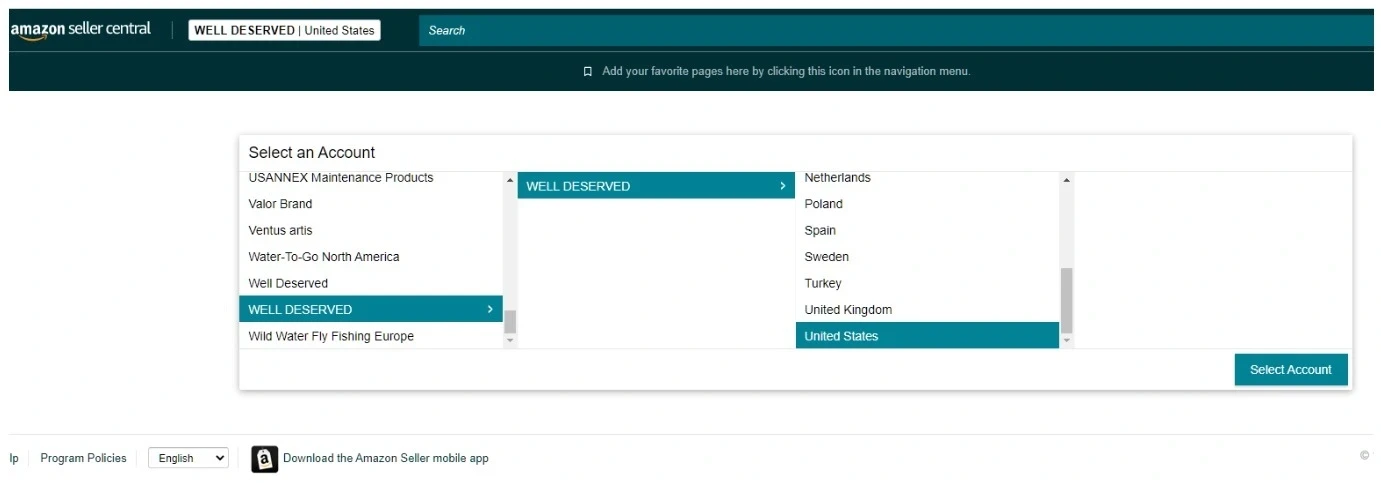
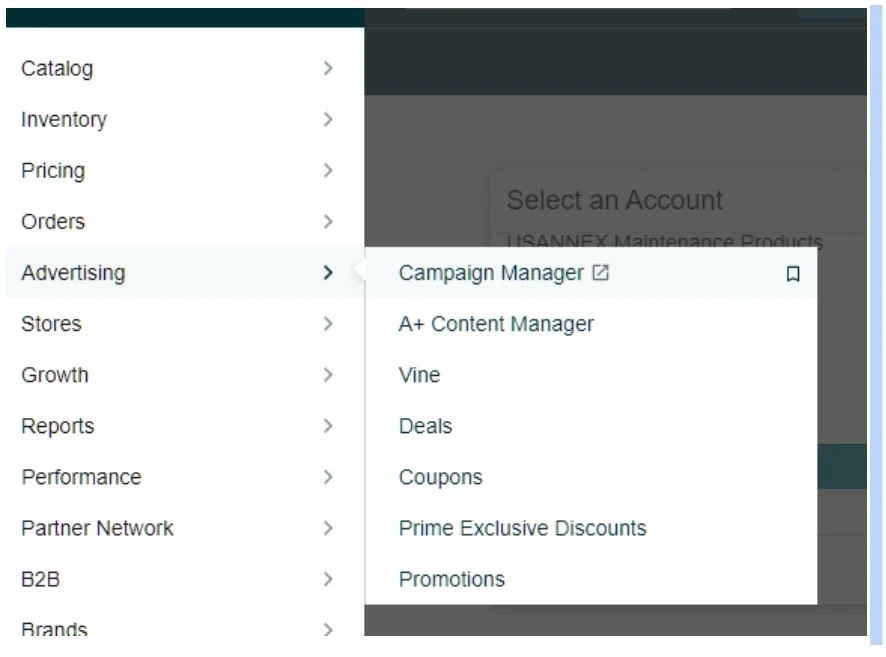
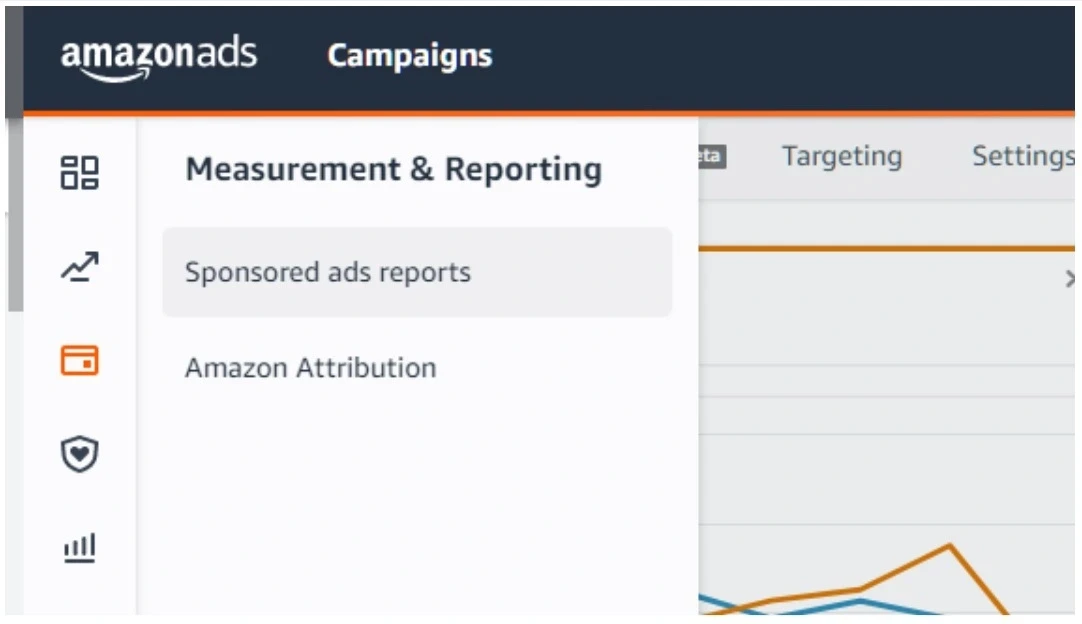
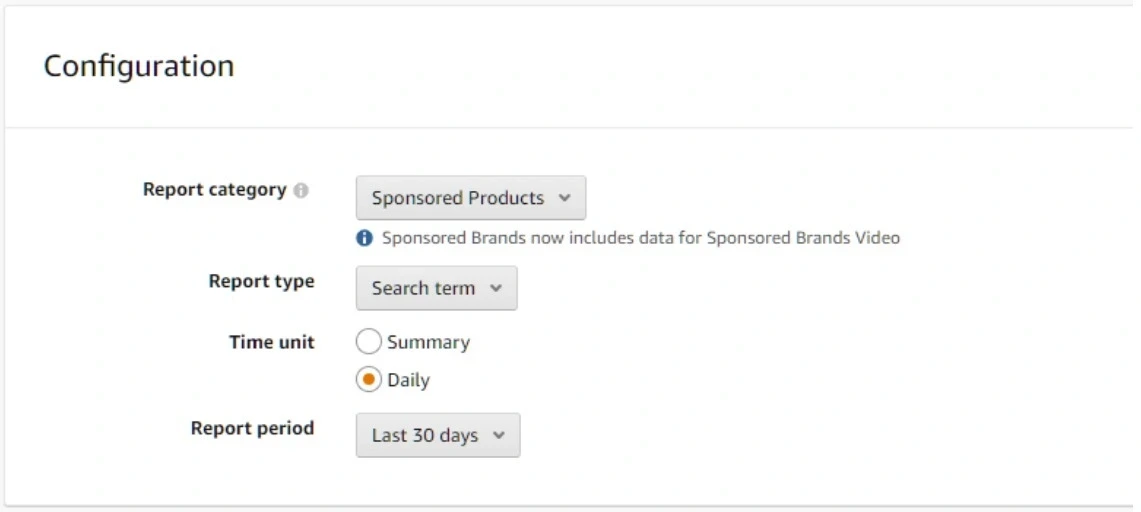
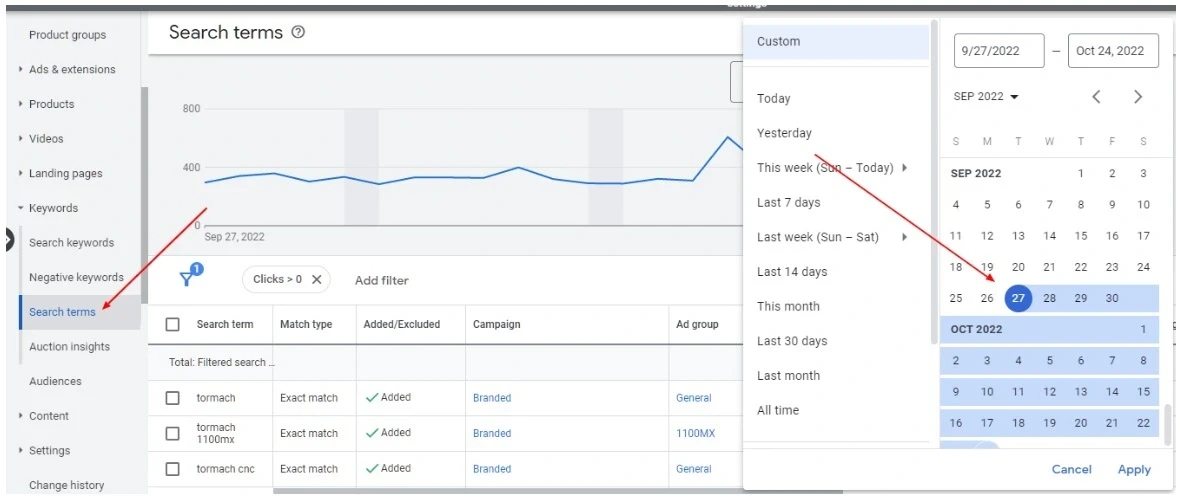
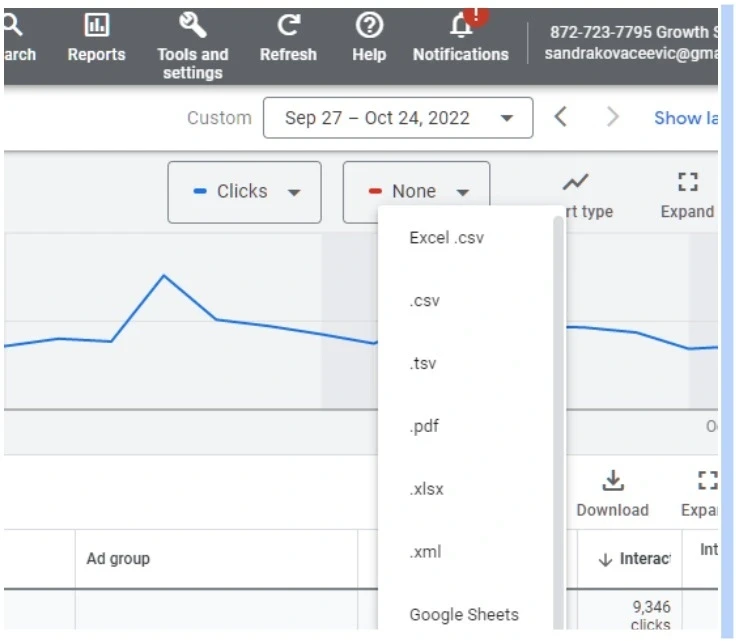
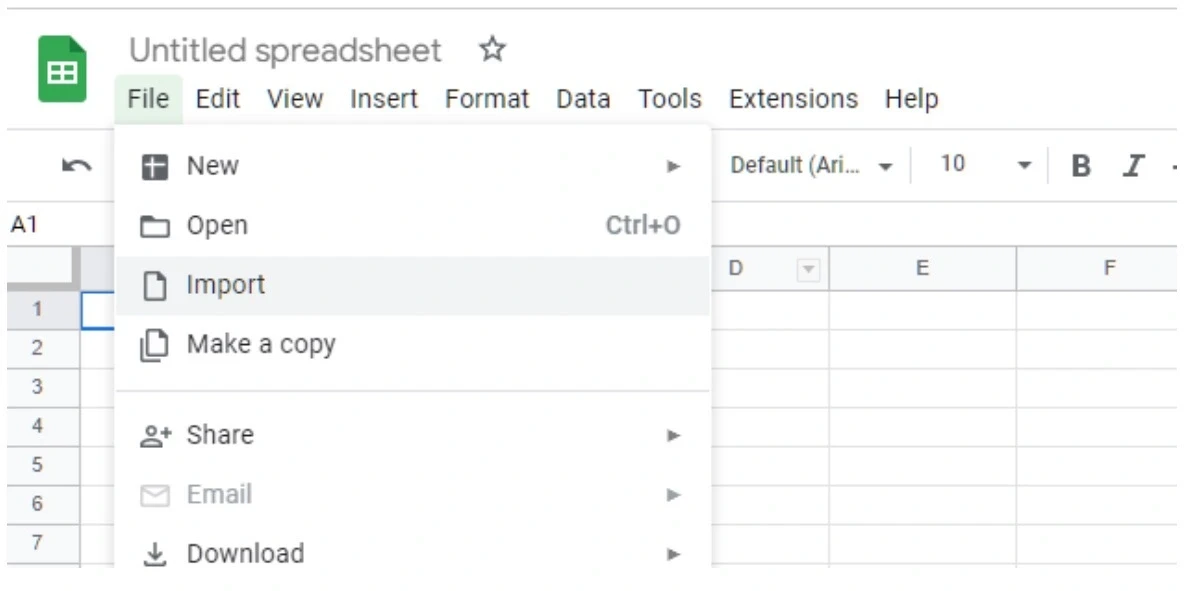
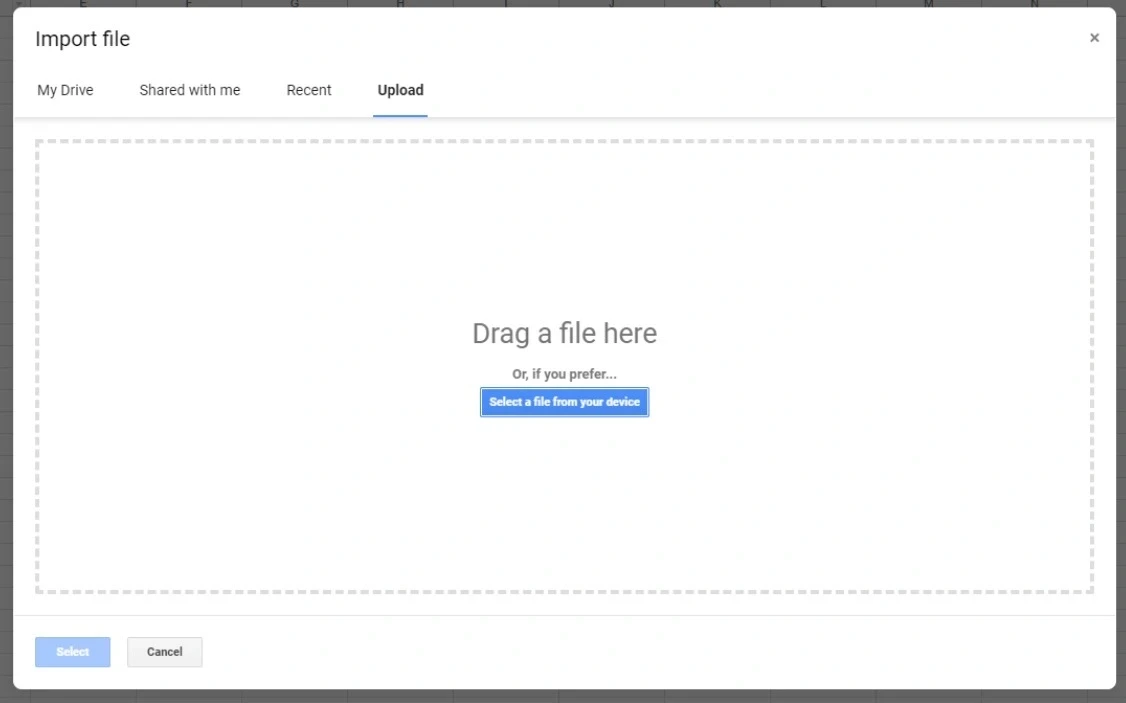
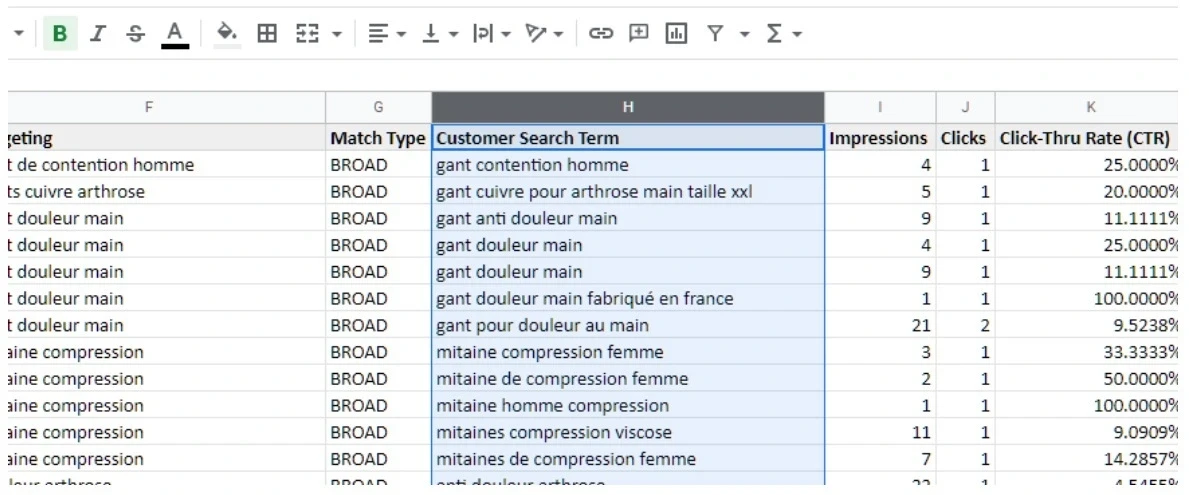
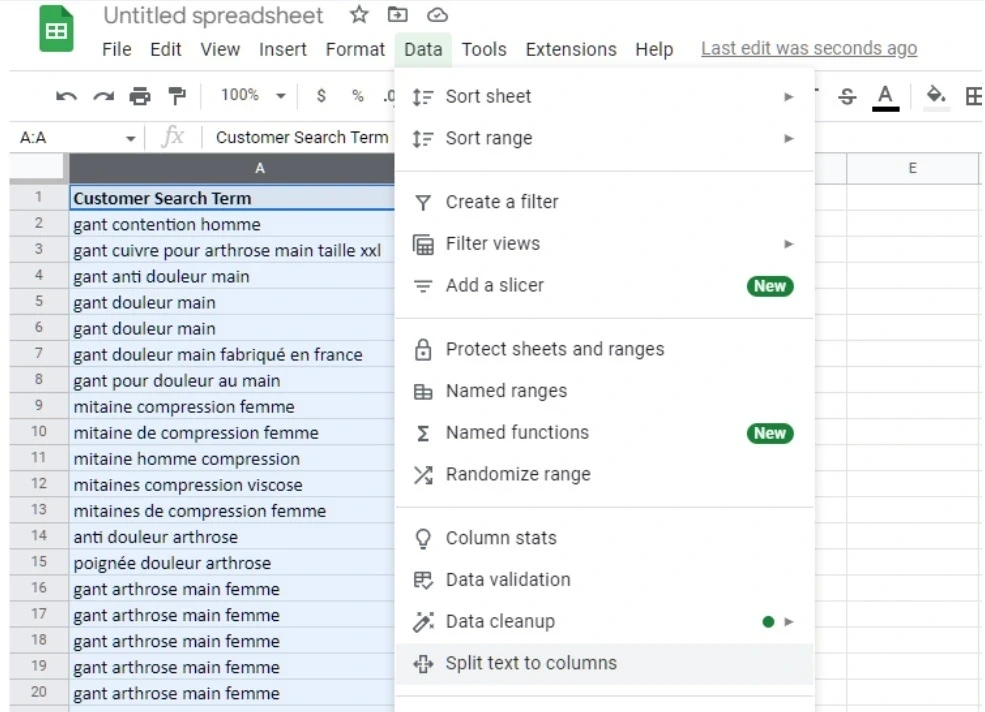
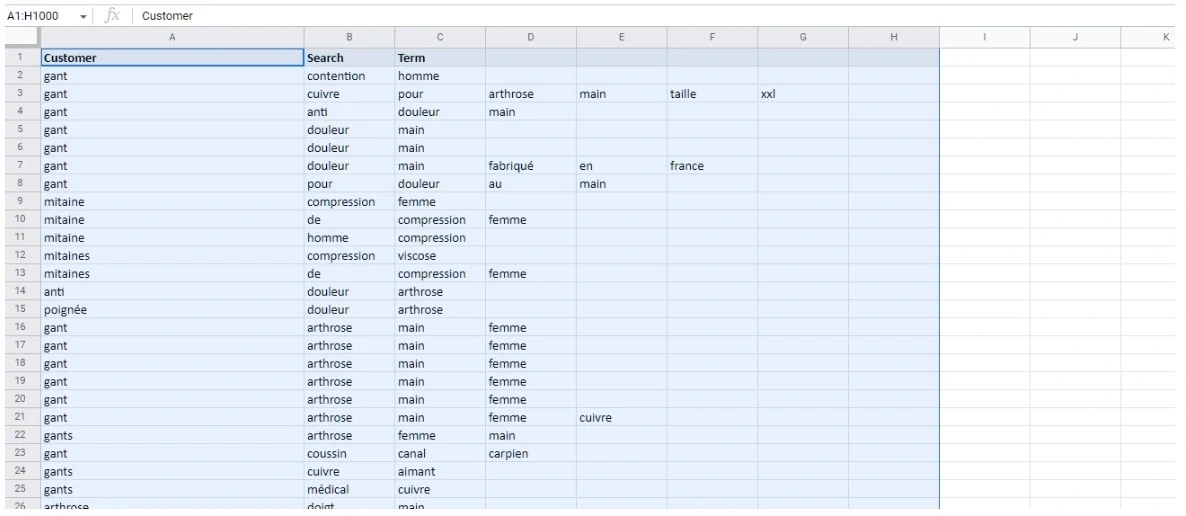
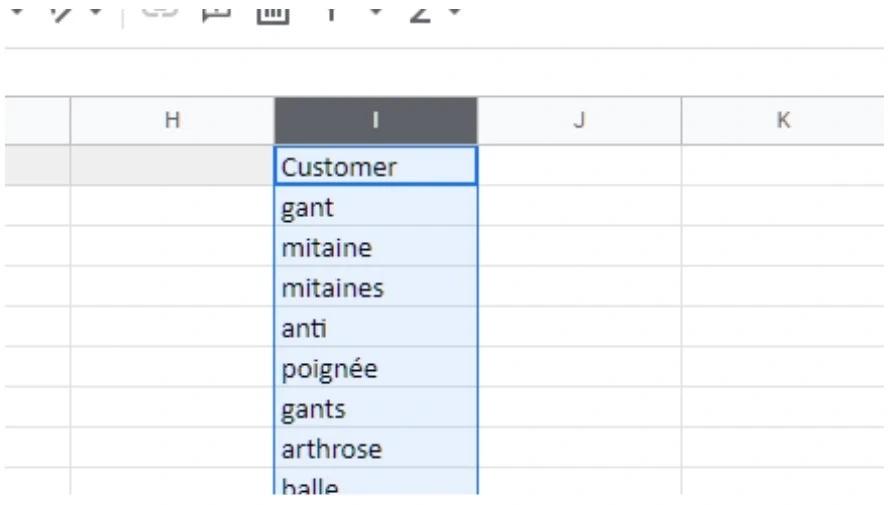
<h2 id="">Unlocking eCommerce Success: The Power of Search Query Performance Reports</h2><p></p><p id="">In the fast-paced world of eCommerce, understanding how customers find your products is more than just a marketing strategy—it's your competitive edge. Search query performance will allow you to understand what keywords convert and what keywords don’t convert while searching for your product. You can use this insight to improve your listing or to add negative keywords to lower ad spend and improve performance. This strategy has been proven successful on both Amazon and Google.</p><p id=""></p><h2 id="">Generating Amazon Sponsored Ads Search Query Performance Report<br><br></h2><h3 id="">Step-by-Step Process:<br><br></h3><p id="">1. <strong id="">Account Access Preparation</strong><br></p><ul id=""><li id="">Log into your Amazon Advertising account</li><li id="">Ensure you have the necessary permissions to access reporting features</li></ul><figure id="" class="w-richtext-figure-type-image w-richtext-align-center" style="max-width:1381px" data-rt-type="image" data-rt-align="center" data-rt-max-width="1381px"><div id=""><img src="https://cdn.prod.website-files.com/65f048f13842211c66ca050c/677cb6242274c52d7b531cd2_677ca778f2e29733630b818d_SearchQuery1-ezgif.com-jpg-to-webp-converter.webp" loading="lazy" alt="__wf_reserved_inherit" width="auto" height="auto" id=""></div></figure><p id=""></p><p id=""> 2. <strong id="">Navigating to the Reporting Section</strong></p><ul id=""><li id="">Click on Advertising/Campaign Manager</li></ul><figure id="" class="w-richtext-figure-type-image w-richtext-align-center" style="max-width:886px" data-rt-type="image" data-rt-align="center" data-rt-max-width="886px"><div id=""><img src="https://cdn.prod.website-files.com/65f048f13842211c66ca050c/677cb6242274c52d7b531ccc_677ca9082db78b568fa1980f_SearchQuery2-ezgif.com-jpg-to-webp-converter.webp" loading="lazy" alt="__wf_reserved_inherit" width="auto" height="auto" id=""></div></figure><ul id=""><li id="">Select "Measurement and Reporting"</li><li id="">Choose "Sponsored Ads Reports"</li></ul><figure id="" class="w-richtext-figure-type-image w-richtext-align-center" style="max-width:1082px" data-rt-type="image" data-rt-align="center" data-rt-max-width="1082px"><div id=""><img src="https://cdn.prod.website-files.com/65f048f13842211c66ca050c/677cb6242274c52d7b531cde_677cb0a732900c278a7d2253_SearchQuery3-ezgif.com-jpg-to-webp-converter.webp" loading="lazy" alt="__wf_reserved_inherit" width="auto" height="auto" id=""></div></figure><p id=""><strong id="">3. Report Configuration</strong> When creating a new report, pay attention to these critical settings:</p><ul id=""><li id=""><strong id="">Report Category</strong>: Select "Sponsored Products"</li><li id=""><strong id="">Report Type</strong>: Choose "Search Term"</li><li id=""><strong id="">Time Unit</strong>: Set to "Daily"</li><li id=""><strong id="">Time Range</strong>: Select the specific period you want to analyze (e.g., last 30 days, quarter-to-date)</li></ul><figure id="" class="w-richtext-figure-type-image w-richtext-align-center" style="max-width:1141px" data-rt-type="image" data-rt-align="center" data-rt-max-width="1141px"><div id=""><img src="https://cdn.prod.website-files.com/65f048f13842211c66ca050c/677cb6242274c52d7b531ccf_677cb1b0b84e82af4cee7f7b_SearchQuery4-ezgif.com-jpg-to-webp-converter.webp" loading="lazy" alt="__wf_reserved_inherit" width="auto" height="auto" id=""></div></figure><p id=""></p><p id=""><strong id="">4. Report Generation</strong></p><ul id=""><li id="">Click "Run Report"</li><li id="">Download the generated report for detailed analysis<br><br></li></ul><h2 id="">Generating Google Ads Search Query Performance Report<br><br></h2><h3 id="">Detailed Extraction Process:<br><br></h3><p id=""><strong id="">1. Accessing Search Terms</strong></p><ul id=""><li id="">Log into your Google Ads account</li><li id="">Navigate to the left-side menu</li><li id="">Select "Keywords"</li><li id="">Click on the "Search Terms" tab</li></ul><figure id="" class="w-richtext-figure-type-image w-richtext-align-center" style="max-width:1180px" data-rt-type="image" data-rt-align="center" data-rt-max-width="1180px"><div id=""><img src="https://cdn.prod.website-files.com/65f048f13842211c66ca050c/677cb6242274c52d7b531cd5_677cb22cfdca05743f49f030_SearchQuery5-ezgif.com-jpg-to-webp-converter.webp" loading="lazy" alt="__wf_reserved_inherit" width="auto" height="auto" id=""></div></figure><p id=""><strong id="">2. Report Preparation</strong></p><ul id=""><li id="">Set your desired time range</li><li id="">Download the report in CSV format</li></ul><figure id="" class="w-richtext-figure-type-image w-richtext-align-center" style="max-width:736px" data-rt-type="image" data-rt-align="center" data-rt-max-width="736px"><div id=""><img src="https://cdn.prod.website-files.com/65f048f13842211c66ca050c/677cb6242274c52d7b531cc3_677cb28a8dc34c34aa230598_SearchQuery6-ezgif.com-jpg-to-webp-converter.webp" loading="lazy" alt="__wf_reserved_inherit" width="auto" height="auto" id=""></div></figure><p id=""></p><p id=""><strong id="">3. Google Sheets Analysis</strong></p><ol id=""><li id="">Open Google Sheet</li><li id="">Import the downloaded CSV:<ul id=""><li id="">Go to File > Import</li><li id="">Upload/drag-and-drop your CSV file</li></ul></li></ol><figure id="" class="w-richtext-figure-type-image w-richtext-align-center" style="max-width:1184px" data-rt-type="image" data-rt-align="center" data-rt-max-width="1184px"><div id=""><img src="https://cdn.prod.website-files.com/65f048f13842211c66ca050c/677cb6242274c52d7b531cdb_677cb2f7736e7465ab461b7e_SearchQuery7-ezgif.com-jpg-to-webp-converter.webp" loading="lazy" alt="__wf_reserved_inherit" width="auto" height="auto" id=""></div></figure><figure id="" class="w-richtext-figure-type-image w-richtext-align-center" style="max-width:1126px" data-rt-type="image" data-rt-align="center" data-rt-max-width="1126px"><div id=""><img src="https://cdn.prod.website-files.com/65f048f13842211c66ca050c/677cb6242274c52d7b531cc0_677cb31148e11078f7cb22ea_SearchQuery8-ezgif.com-jpg-to-webp-converter.webp" loading="lazy" alt="__wf_reserved_inherit" width="auto" height="auto" id=""></div></figure><p id=""><strong id="">4, Keyword Extraction Technique</strong></p><ul id=""><li id="">Select the "Search Term" column</li><li id="">Copy the entire column</li><li id="">Paste into column A of a new sheet</li></ul><figure id="" class="w-richtext-figure-type-image w-richtext-align-fullwidth" style="max-width:1189px" data-rt-type="image" data-rt-align="fullwidth" data-rt-max-width="1189px"><div id=""><img src="https://cdn.prod.website-files.com/65f048f13842211c66ca050c/677cb6242274c52d7b531cf7_677cb37196e88a6594b597d3_SearchQuery9-ezgif.com-jpg-to-webp-converter.webp" loading="lazy" alt="__wf_reserved_inherit" width="auto" height="auto" id=""></div></figure><p id=""></p><p id=""><strong id="">5. Advanced Keyword Breakdown</strong></p><ul id=""><li id="">Select the column</li><li id="">Navigate to Data > Split text to columns</li><li id="">Choose "Space" as the separator</li><li id="">This breaks multi-word search terms into individual words</li></ul><figure id="" class="w-richtext-figure-type-image w-richtext-align-center" style="max-width:985px" data-rt-type="image" data-rt-align="center" data-rt-max-width="985px"><div id=""><img src="https://cdn.prod.website-files.com/65f048f13842211c66ca050c/677cb6242274c52d7b531ce8_677cb3c48201b21805969a17_SearchQuery10-ezgif.com-jpg-to-webp-converter.webp" loading="lazy" alt="__wf_reserved_inherit" width="auto" height="auto" id=""></div></figure><p id=""></p><figure id="" class="w-richtext-figure-type-image w-richtext-align-center" style="max-width:1186px" data-rt-type="image" data-rt-align="center" data-rt-max-width="1186px"><div id=""><img src="https://cdn.prod.website-files.com/65f048f13842211c66ca050c/677cb6242274c52d7b531cc6_677cb3e41b31d0d2874b25bc_SearchQuery11-ezgif.com-jpg-to-webp-converter.webp" loading="lazy" alt="__wf_reserved_inherit" width="auto" height="auto" id=""></div></figure><p id=""><strong id="">6. Unique Keyword Extraction</strong></p><ul id=""><li id="">In the first non-highlighted cell, use this powerful formula:<br> Copy<br>=UNIQUE({A:A;B:B;C:C;D:D;E:E...})<br><br></li><li id="">Note: Adjust column references based on your specific report's word count</li></ul><figure id="" class="w-richtext-figure-type-image w-richtext-align-center" style="max-width:1385px" data-rt-type="image" data-rt-align="center" data-rt-max-width="1385px"><div id=""><img src="https://cdn.prod.website-files.com/65f048f13842211c66ca050c/677cb6242274c52d7b531cc9_677cb42f7d48e8e0ec7c11df_SearchQuery12-ezgif.com-jpg-to-webp-converter.webp" loading="lazy" alt="__wf_reserved_inherit" width="auto" height="auto" id=""></div></figure><p id=""></p><p id="">This formula will extract the unique words from all the columns and put it into one single column.</p><figure id="" class="w-richtext-figure-type-image w-richtext-align-center" style="max-width:894px" data-rt-type="image" data-rt-align="center" data-rt-max-width="894px"><div id=""><img src="https://cdn.prod.website-files.com/65f048f13842211c66ca050c/677cb6242274c52d7b531cd8_677cb452de0de8643df99f50_SearchQuery13-ezgif.com-jpg-to-webp-converter.webp" loading="lazy" alt="__wf_reserved_inherit" width="auto" height="auto" id=""></div></figure><p id=""></p><h2 id="">Pro Tips from Growth Scalers<br><br></h2><p id="">🔍 Pro Tip: Always maintain a consistent approach to these reports. Set a regular schedule (monthly) to track changes and trends. Platform like Google or Amazon often generate new keyword that might not convert and waste your ad spend.<br><br></p><h3 id="">What to Look For:<br><br></h3><p id="">When analyzing these reports, there are several key insights you should pay attention to. Look for unexpected search terms that are driving conversions—they could reveal hidden opportunities you haven’t considered. Also, identify search terms with low ROAS; these may signal a mismatch between customer intent and your ads. Lastly, make a list of top keywords and add any new suggested keywords with those word in it.<br><br></p><h2 id="">Need Expert Guidance?<br><br></h2><p id="">At Growth Scalers, we specialize in transforming raw data into actionable growth strategies. If this process seems overwhelming, our platform experts are ready to help you navigate and maximize your search query performance.<br><br>Ready to unlock your eCommerce potential? Let's talk strategy!<br><br></p>