How to Create Your Amazon Seller Account?
Tue Mar 12 2024 12:34:41 GMT+0000 (Coordinated Universal Time)

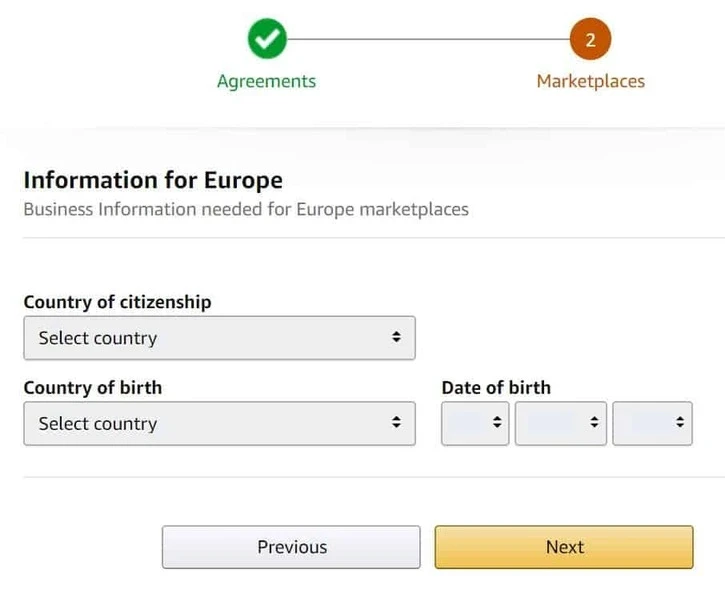
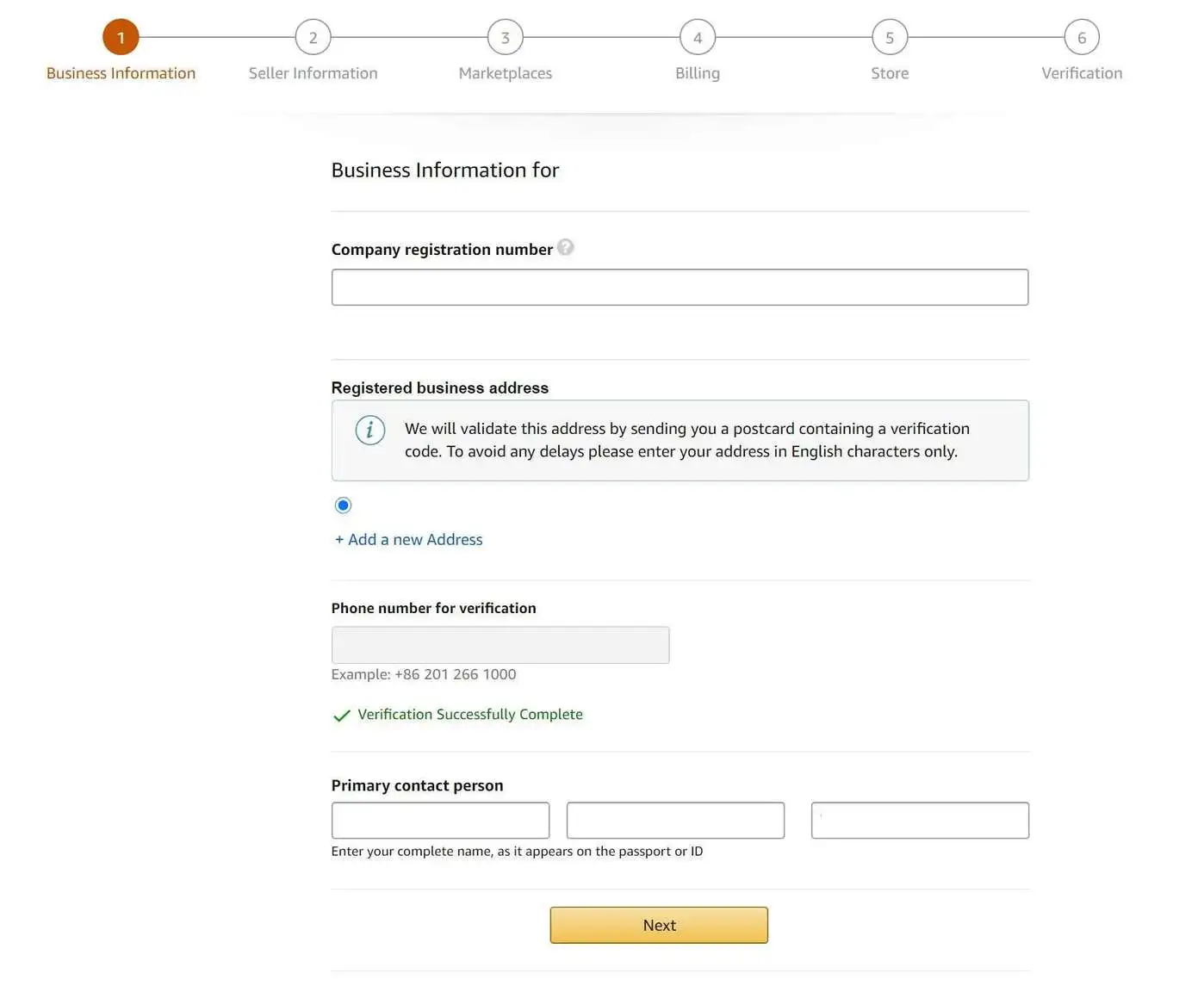
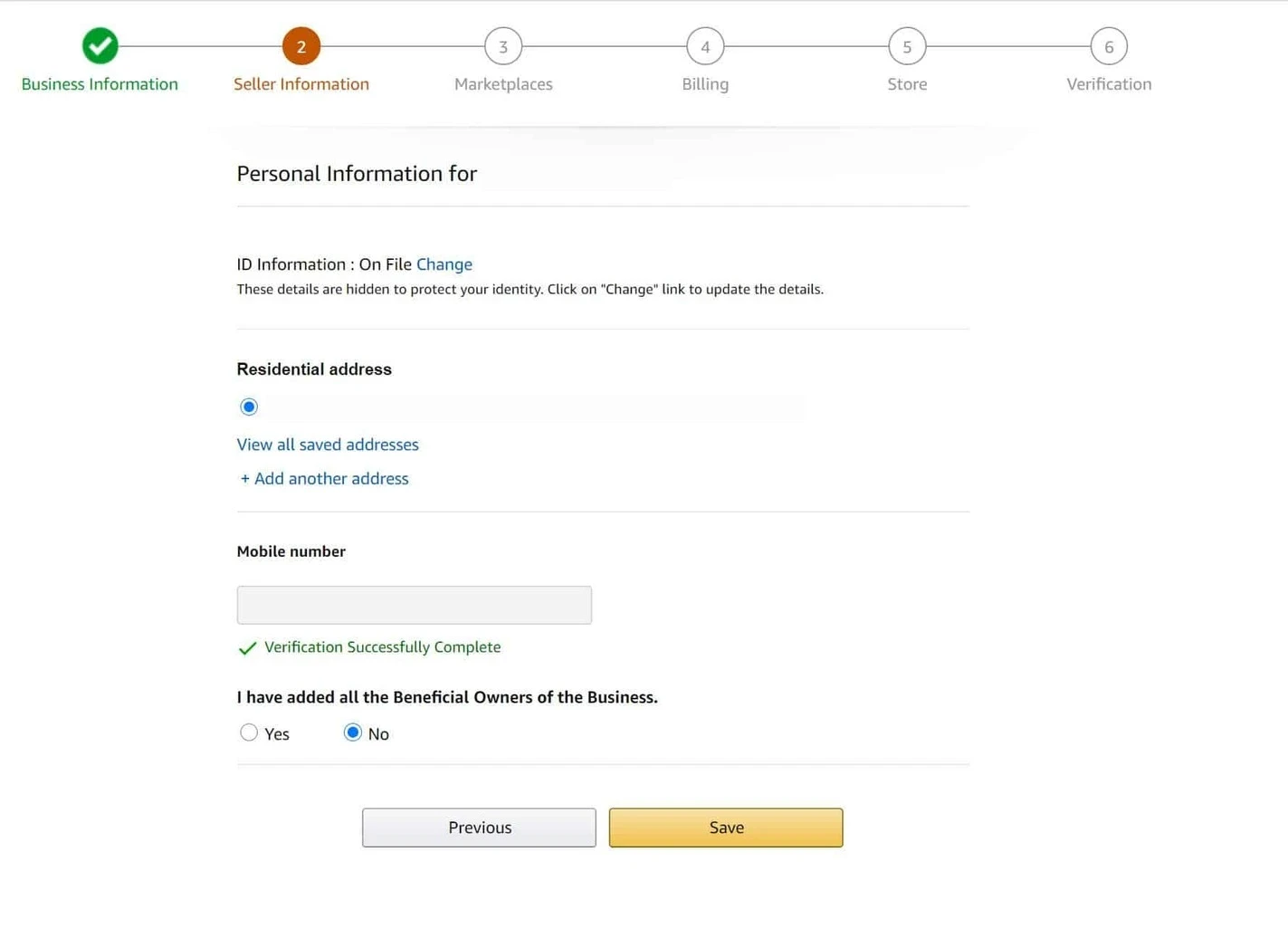
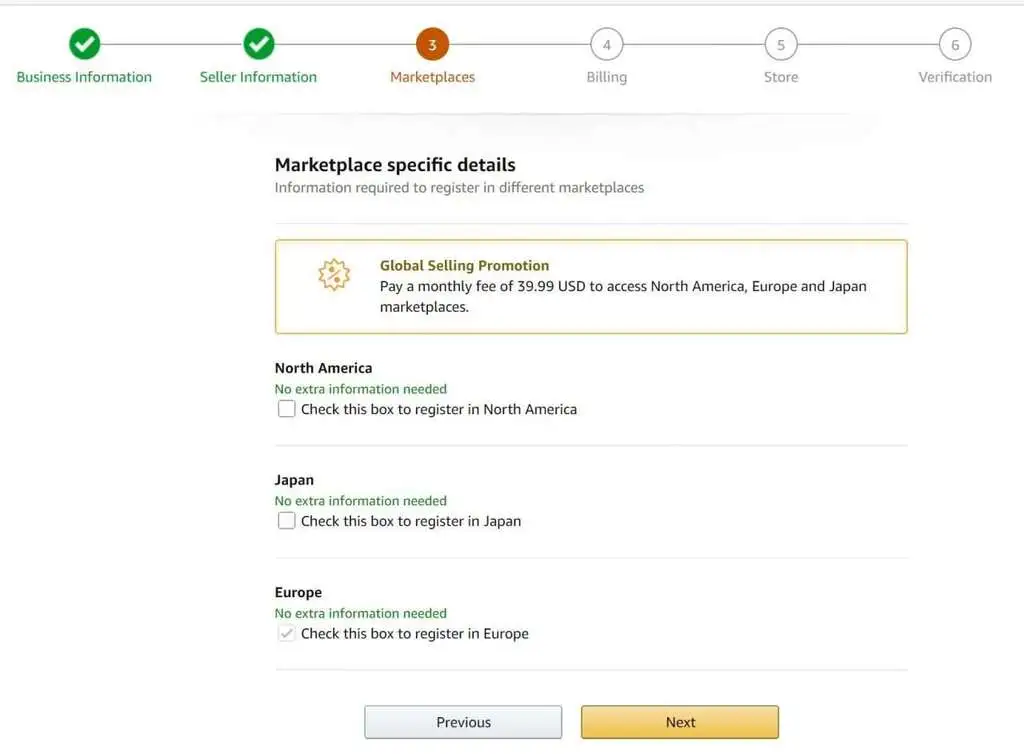
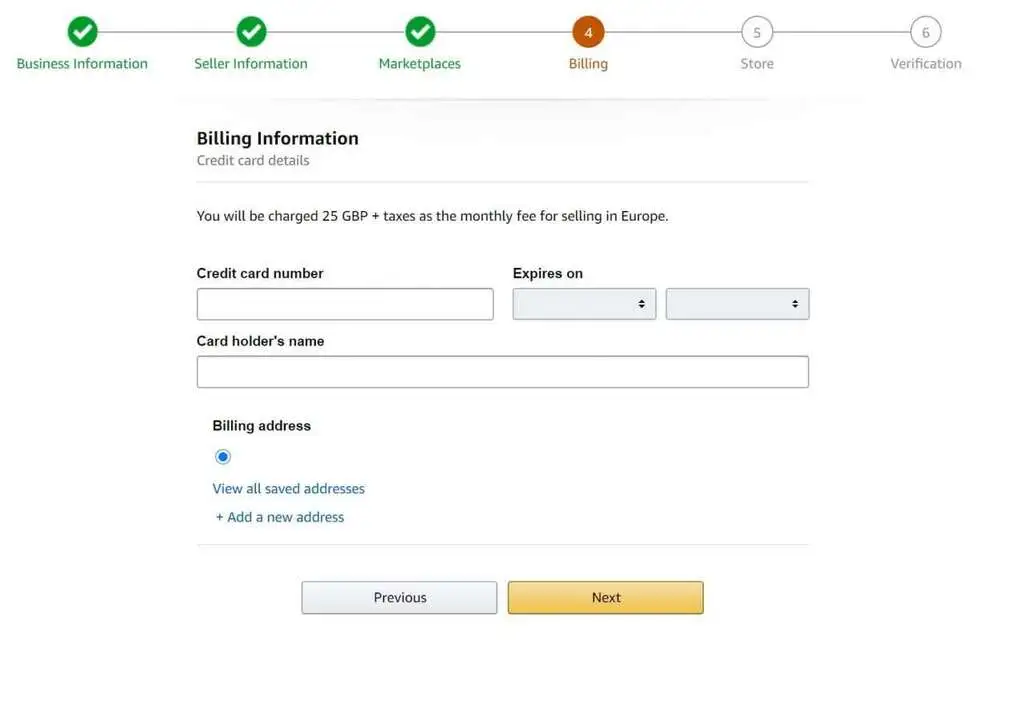
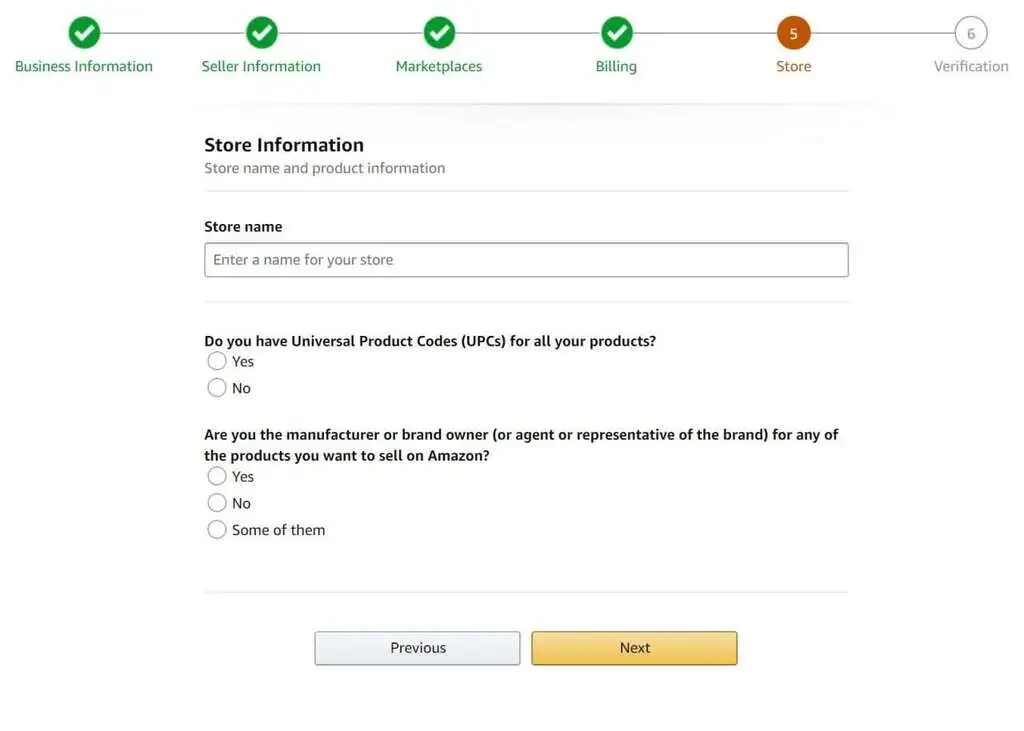
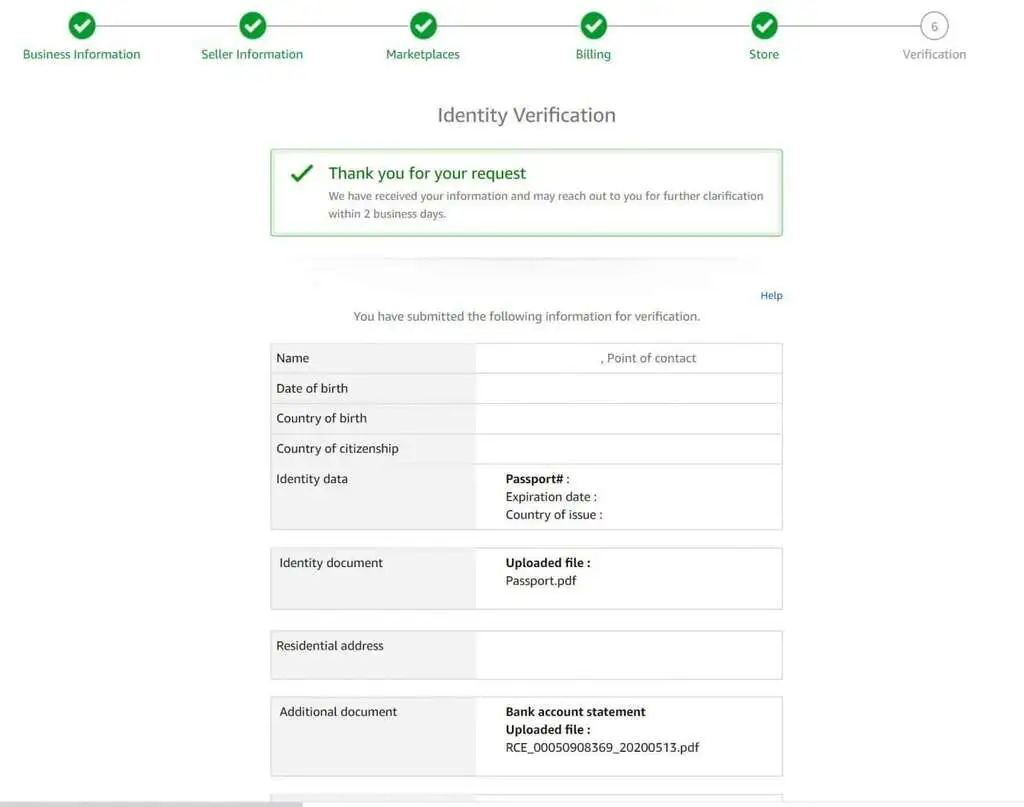
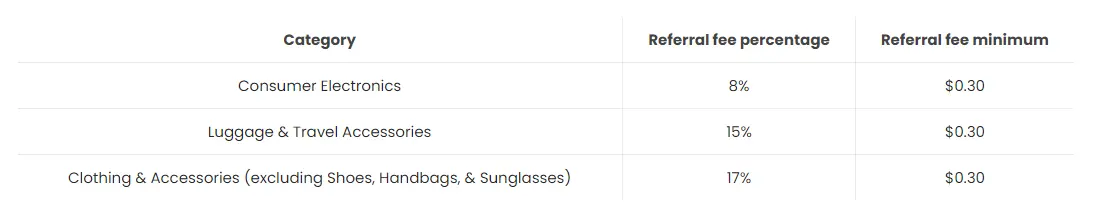
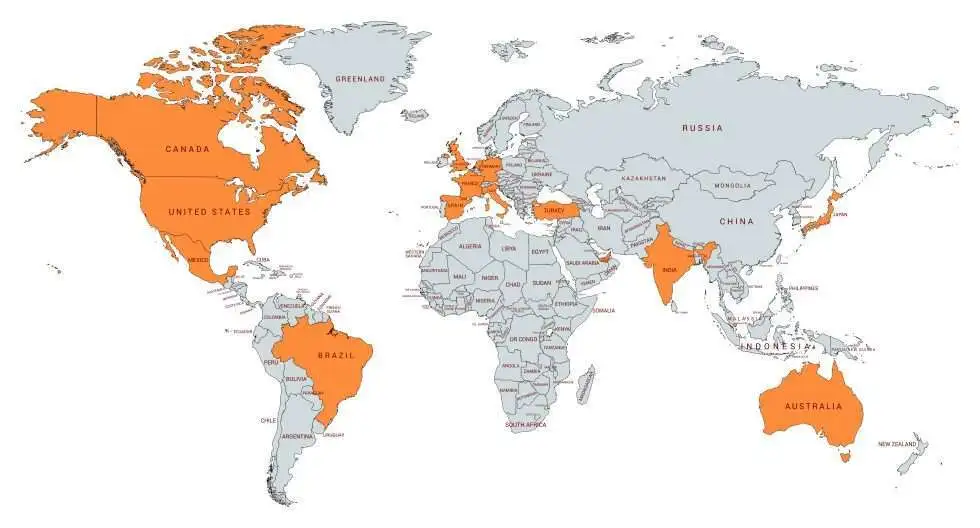
<p id="">Unlike other channels like Google, Social Media or Display advertising, Amazon is a platform where consumers intend to buy a product that they are looking for. As a result, the conversion rate on Amazon is on average 3 times higher than on any other platforms.</p><p id="">Amazon has opened it’s marketplace to international sellers and we will see in this article how to get started selling your product on Amazon and what you need to know.</p><h2 id="">Create your Amazon account</h2><p id="">Amazon can be quite diligent regarding any document you submit. Therefore, to avoid any frustration, before you start creating your Amazon seller account, make sure that you have the following information.</p><ol id=""><li id="">Bank statement: the bank account will be used by Amazon to pay your sales. Professional sellers get paid by Amazon every two weeks</li><li id="">Credit Card: This will be used to pay for the monthly subscription fee and the referral fees</li><li id="">A valid address: Amazon will send you a postcard to confirm it</li><li id="">A valid ID document: Passport or Id card depending on the country you are from</li></ol><p id="">N.B: Only a legal representative of the company can create the account.</p><p id="">Are you ready to create your account? Go to Amazon Seller Central and follow the next steps:</p><h2 id="">Business Information</h2><p id="">First of all, you will be asked to enter your personal information.</p><p id="">Note that you need to be a legal representative of the company.</p><p id=""></p><figure id="" class="w-richtext-figure-type-image w-richtext-align-center" data-rt-type="image" data-rt-align="center"><div id=""><img src="https://cdn.prod.website-files.com/65f048f13842211c66ca050c/6735f31541053e41283b82e5_6735f16209c891c9325d5ffe_step-0-account-creation-1-amazon-seller-account-registration.webp" loading="lazy" alt="step-0-account-creation-1-amazon-seller-account-registration" width="auto" height="auto" id=""></div></figure><p id="">You can also add other contact people even though this is not mandatory.</p><p id=""></p><figure id="" class="w-richtext-figure-type-image w-richtext-align-center" data-rt-type="image" data-rt-align="center"><div id=""><img src="https://cdn.prod.website-files.com/65f048f13842211c66ca050c/6735f31541053e41283b82e0_6735f1fb4fd4ee4a92798cd1_Step-1-business-info.webp" loading="lazy" alt="Step-1-business-info" width="auto" height="auto" id=""></div></figure><p id="">You will be asked to input your company’s address as well as your mobile phone number for verification.</p><p id=""></p><figure id="" class="w-richtext-figure-type-image w-richtext-align-center" data-rt-type="image" data-rt-align="center"><div id=""><img src="https://cdn.prod.website-files.com/65f048f13842211c66ca050c/6735f3d7e020f7bb4ff28976_6735f3c48004cf46d523a8b2_Step-2-seller-info.webp" loading="lazy" alt="__wf_reserved_inherit" width="auto" height="auto" id=""></div></figure><h2 id="">Marketplaces</h2><p id="">Amazon Global Selling allows sellers to sell on the following marketplaces:</p><ul id=""><li id="">North America (United States, Canada, Mexico and Brazil)</li><li id="">Europe (Germany, United Kingdom, France, Italy, Spain, Netherlands)</li><li id="">Asia-Pacific (Japan, Australia, Singapore, India)</li><li id="">Middle East and North Africa (Middle East and Turkey)</li></ul><p id="">If you are not sure which Marketplace to start with, just select where you operate, you will be able to change this selection later.</p><p id=""></p><figure id="" class="w-richtext-figure-type-image w-richtext-align-center" data-rt-type="image" data-rt-align="center"><div id=""><img src="https://cdn.prod.website-files.com/65f048f13842211c66ca050c/6735f52da5f9052a5faedbf2_6735f51f49b21433f5054316_step-3-marketplace-amazon-seller-account-registration-1280x943-.webp" loading="lazy" alt="__wf_reserved_inherit" width="auto" height="auto" id=""></div></figure><p id="">After choosing the marketplace where you want to sell your product, you need to input your credit card to pay for Amazon fees. Usually, if you create an account and for any reason you could not sell your product, your credit card will not be charged.</p><p id=""></p><figure id="" class="w-richtext-figure-type-image w-richtext-align-center" data-rt-type="image" data-rt-align="center"><div id=""><img src="https://cdn.prod.website-files.com/65f048f13842211c66ca050c/673690af360f8c68efa5b5ef_67368e565954cb52f3cc0591_step-4-billing-amazon-seller-account-registration.webp" loading="lazy" alt="step-4-billing-amazon-seller-account-registration" width="auto" height="auto" id=""></div></figure><p id="">To be able to communicate your brand better you can create a store. Amazon protects sellers with brands and trademark. Therefore, if you have one, you should add it to enforce your right and avoid other sellers using your brand.</p><p id=""></p><figure id="" class="w-richtext-figure-type-image w-richtext-align-center" data-rt-type="image" data-rt-align="center"><div id=""><img src="https://cdn.prod.website-files.com/65f048f13842211c66ca050c/673690af360f8c68efa5b5f2_67368eff1e271eb31a9e26b3_step-5-store-amazon-seller-account-registration-1280x914-1.webp" loading="lazy" alt="step-5-store-amazon-seller-account-registration-1280x914-1" width="auto" height="auto" id=""></div></figure><p id="">Finally, after submitting your information it can take up to 2 business days before your account is approved.</p><p id=""></p><figure id="" class="w-richtext-figure-type-image w-richtext-align-center" data-rt-type="image" data-rt-align="center"><div id=""><img src="https://cdn.prod.website-files.com/65f048f13842211c66ca050c/673690af360f8c68efa5b5e7_67368f786726a4774f7b75df_step-6-verification-amazon-seller-account-registration-1280x1009-1.webp" loading="lazy" alt="step-6-verification-amazon-seller-account-registration-1280x1009-1" width="auto" height="auto" id=""></div></figure><h2 id="">How much does it cost to sell on Amazon?</h2><p id="">Amazon offer different services for sellers in order to scale their E-commerce business. Here is the breakdown of the cost that you should expect.</p><p id="">Subscription fee</p><p id="">You can decide between two selling plans:</p><ul id=""><li id="">Individual for $ 0.99 / item sold until 40 units a month</li><li id="">Professional for $ 39.99 / month</li></ul><p id="">Because the individual plan is very limited, we advise you to choose the professional plan. In addition, usually, Amazon doesn’t charge the selling plan fees if you did not make any sales. Therefore, it is more beneficial to start directly with the Professional Plan.</p><h2 id="">Selling fee a.k.a. Referral fees</h2><p id="">Amazon lets you sell your products on its platform but it comes at a cost. Like every affiliate marketing plan, Amazon charges a referral fee around 15% of your sales depending on your product category.</p><p id=""></p><figure id="" class="w-richtext-figure-type-image w-richtext-align-center" data-rt-type="image" data-rt-align="center"><div id=""><img src="https://cdn.prod.website-files.com/65f048f13842211c66ca050c/673690af360f8c68efa5b5ec_6736901552c030dc108dc3dc_amazon-selling-table.webp" loading="lazy" alt="amazon-selling-table" width="auto" height="auto" id=""></div></figure><h4 id=""></h4><p id="">If you sell for instance a mobile phone for $500, Amazon will charge you 8% * $500= $40 per sales.</p><p id="">If you sell a luggage for $300, Amazon will charge you 15% * $300 = $45 per sales…</p><p id="">Note that this is higher than the referral fee minimum.</p><p id="">Check here if you want to know the referral fee for each category.</p><h2 id="">FBA or FBM?</h2><p id="">Building an e-commerce business can be quite demanding. It requires warehouse, logistics and great operations. Thankfully, Amazon allows you to use its logistic network and benefit from its infrastructure. This is called FBA: Fulfillment By Amazon. This service from Amazon comes with an additional fulfillment fee but allows you to focus on your business and on your products. In addition, it reduces the initial investment that you would need for warehousing and manpower to expand your business.</p><figure id="" class="w-richtext-figure-type-video w-richtext-align-center" style="padding-bottom:33.75%" data-rt-type="video" data-rt-align="center" data-rt-max-width="" data-rt-max-height="33.75%" data-rt-dimensions="0:0" data-page-url=""><div id=""><iframe src="https://www.youtube.com/embed/U17Atp0oH84?wmode=opaque" allowfullscreen=""></iframe></div></figure><p id="">If you want to find out what would be the cost of selling on Amazon for a given product, you can check Amazon Revenue Calculator</p><p id="">Finally, selling internationally can be quite a headache with regard to taxes. To facilitate this, Amazon offers one-year free VAT Service to help you get started with your e-commerce business</p><h2 id="">Where can you sell?</h2><p id="">Amazon marketplaces are currently open for sellers in the following countries:</p><p id="">This means that by selling on Amazon, you can reach 2.65 billion customers.</p><p id=""></p><figure id="" class="w-richtext-figure-type-image w-richtext-align-center" data-rt-type="image" data-rt-align="center"><div id=""><img src="https://cdn.prod.website-files.com/65f048f13842211c66ca050c/673690af360f8c68efa5b5e4_673690a9aed014d01f8db1f5_where-you-can-sell-on-amazon-amazon-marketplace-980x528-1.webp" loading="lazy" alt="__wf_reserved_inherit" width="auto" height="auto" id=""></div></figure><p id="">If you are still unsure about selling your product on Amazon or if you are struggling to implement your online strategy, we offer a free consultation. Feel free to contact us to learn more about it.</p><p id="">Also, check out our last post to boost sales for your ecommerce shop: <a href="https://www.growthscalers.com/article/the-ultimate-guide-to-advertise-online" target="_blank" id="">Ultimate Guide to advertise online</a></p><p id=""></p>