Ranking organically helps you getting free sales on Amazon. You don’t need to pay any dollar in advertising. This can highly improve your bottom line.
Why Keywords Matter More Than You Think
Amazon's search algorithm is based on product title and organic keywords. Keywords help you to be indexed for additional keywords that you don’t want to include in your title. Amazon will index your product for any combination of keywords in your title and in your organic keywords.
So for instance, if you are selling a product in different size and color but don’t want to have this in your title, you can add those keywords into the backend of your listing. Also, you should add any keywords that people could use if they search for your product in another language (for instance Spanish in the US, French in CA…)
Step-by-Step Keyword Research Procedure
Step 1: Competitor Analysis with Helium 10 Cerebro
Identify Top Competitors
Select 9 top-performing competitor ASINs
Include 1 of your own product ASIN
Run Cerebro with Precise Filters
Set Search Volume filter to 300+ searches
Choose "Organic" Match Type
Download results as CSV file
Step 2: Keyword Relevance Assessment
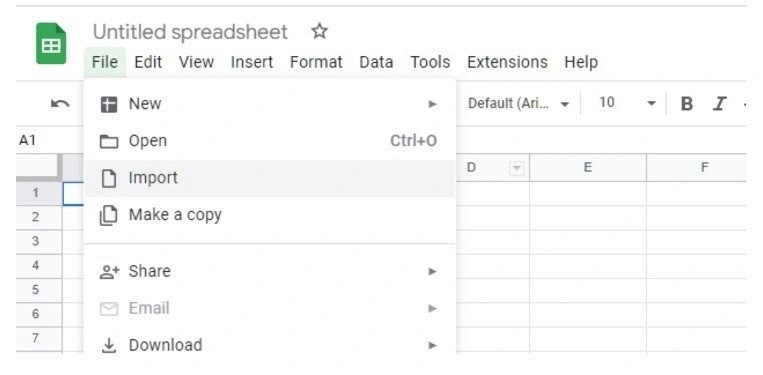
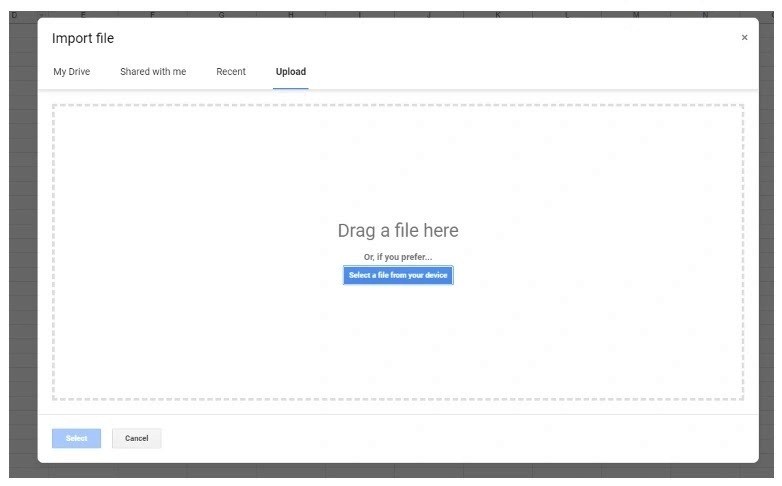
Import CSV to Google Sheets
Use File > Import/Upload
Drag and drop the downloaded file
Evaluate Keyword Relevancy
Use COUNTIF formula (=countif(G7:P7,"<30"))
Relevancy Scale:
5-9 competitors ranking = High Relevance
Indicates high traffic and potential competition
Keyword Selection
Filter keywords with relevancy ≥7
Copy Keyword Phrase column
Step 3: Keyword Optimization
Keyword Refinement
Split keywords by words
Extract unique keywords using =UNIQUE() formula
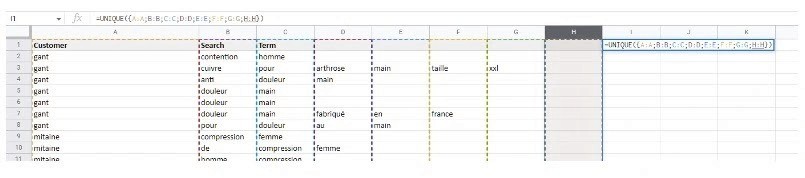
Copy keywords to notepad to remove formatting
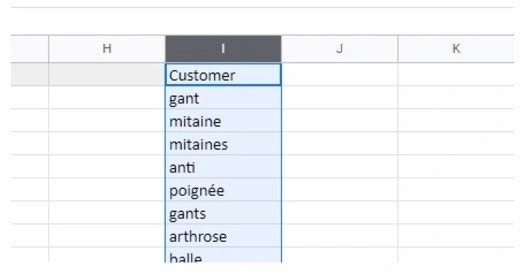
Keyword Cleaning
Remove plural forms
Eliminate keywords already in product title
Ensure total byte count is under 251 bytes
Step 4: Implementing Keywords
Amazon Seller Central
Go to Inventory > Manage All Inventory
Click 'Edit' for specific listing
Navigate to Product Details > Generic Keyword
Paste optimized keywords
Save changes
Pro Tips for Keyword Success
Regularly update your keyword strategy
Balance between high-volume and specific long-tail keywords
Monitor competitor keyword changes
Ready to Scale Your Amazon Business?
Keyword research is just the beginning. At Growth Scalers, we transform complex eCommerce challenges into growth opportunities. Our dedicated platform experts are ready to take your Amazon strategy to the next level.
Don't let your products get lost in the Amazon marketplace. Let's optimize your visibility together!
